
Text Case Converter
Use this free text case converter to convert text to uppercase, lowercase, title case, sentence case, capitalized case, and alternating case instantly. Paste your text, choose a case format, and copy the converted result in seconds.
This online case converter also has inverse case, a Title Case style menu (AP, APA, Chicago, MLA), and coding cases such as camelCase, snake_case and kebab-case.
Table of Contents
Use these quick links to understand this online text case conversion tool.
- What is a Text Case Converter?
- How to Use This Text Case Converter
- Available Text Case Options
- Extra Features of This Case Converter
- See the Same Sentence in Every Case
- Why Use an Online Case Converter?
- Title Case vs Sentence Case vs Capitalized Case
- Title Case Rules: AP, APA, Chicago and MLA
- When to Use Each Text Case
- How to Fix Caps Lock Text
- How to Change Case in Word, Excel and Google Docs
- What Is Alternating Case (SpongeBob Text)?
- Coding Cases: camelCase, snake_case and kebab-case
- What a Case Converter Cannot Do
- Related Text Tools
- FAQs About Text Case Converter
What is a Text Case Converter?
A text case converter is an online tool that changes the capitalization style of your text. It can convert text to uppercase, lowercase, title case, sentence case, capitalized case, and alternating case without manual editing.
This text case converter is useful for writers, students, bloggers, editors, marketers, developers, teachers, and anyone who needs to quickly format headings, titles, captions, product descriptions, article drafts, or copied text.
People search for this tool in many ways: case converter, online case converter, free case converter, or text case changer. They all mean the same thing: a tool that changes how letters are capitalized so you do not have to retype your text.
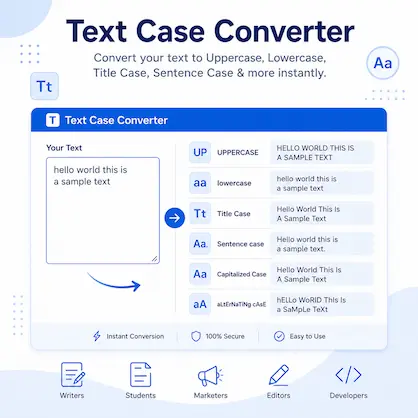
Instead of retyping text by hand, paste your content into the box, select the case format you need, and copy the clean result. The tool runs directly in your browser, so it is fast, simple, and practical for everyday text formatting tasks.
How to Use This Text Case Converter
Paste Your Text
Copy any text and paste it into the input box above.
Choose Case Format
Select a writing case such as uppercase, lowercase, title case, sentence case, capitalized case, alternating case, or inverse case. Developers can pick a coding case such as camelCase or snake_case.
Copy the Result
Review your converted text and copy the clean output instantly.
Fine-Tune (Optional)
For Title Case, pick AP, APA, Chicago, or MLA rules. Keep the acronyms box ticked if you want words like NASA to stay in capitals.
Undo or Download (Optional)
Click Undo to go back one step, or click Download .txt to save the converted text as a plain text file.
Check the Count
The live counter under the input box shows characters, words, and lines while you type or paste.
Available Text Case Options
Uppercase Converter
Convert all letters into uppercase for headings, labels, warnings, and strong emphasis.
Lowercase Converter
Change all letters into lowercase for clean formatting, normalized text, and simple cleanup.
Title Case Converter
Capitalize important words for titles, headings, blog posts, article names, and page titles.
Sentence Case Converter
Capitalize the first letter of each sentence while keeping the rest of the sentence natural.
Capitalized Case
Capitalize the first letter of every word for labels, names, short text, and formatted lists.
Alternating Case
Create alternating uppercase and lowercase text for creative, casual, or stylized formatting.
Inverse Case (Toggle Case)
Swap every letter so capitals become small letters and small letters become capitals, like tOGGLE cASE.
camelCase Converter
First word in lowercase, every next word starts with a capital, with no spaces. Common for JavaScript and Java variables.
PascalCase Converter
Every word starts with a capital and there are no spaces. Common for class names in code.
snake_case Converter
Lowercase words joined by underscores. Common in Python and for file names.
kebab-case Converter
Lowercase words joined by hyphens. Common in URLs, CSS class names, and file names.
CONSTANT_CASE Converter
Uppercase words joined by underscores. Common for fixed values (constants) in code.
Extra Features of This Case Converter
Besides the case buttons, this free case converter has a few extra tools that save time when you edit real text.
Title Case Style Menu
Choose AP, APA, Chicago, or MLA rules. Each style decides in a different way which small words stay lowercase.
Acronym and "I" Protection
Words like NASA, HTML, and iPhone can keep their capitals in Title Case and Sentence case, and the word "I" stays a capital. You can switch this off with the tick box.
Undo Button
Changed your mind, or cleared the box by mistake? Undo brings back your last case choice or the text you cleared.
Download as .txt
Save the converted text as a plain text file with one click.
Live Counter
See characters, words, and lines for your input as you type. For a deeper count, try the Word Counter for Essays.
Private in Your Browser
The conversion runs in your browser. This tool does not upload or save your text.
See the Same Sentence in Every Case
The table shows what each button does to the sentence "The lazy fox jumps over the fence". Use it to pick the right case quickly.
| Case | Result |
|---|---|
| UPPERCASE | THE LAZY FOX JUMPS OVER THE FENCE |
| lowercase | the lazy fox jumps over the fence |
| Title Case (AP, APA) | The Lazy Fox Jumps Over the Fence |
| Title Case (Chicago, MLA) | The Lazy Fox Jumps over the Fence |
| Sentence case | The lazy fox jumps over the fence |
| Capitalized Case | The Lazy Fox Jumps Over The Fence |
| aLtErNaTiNg cAsE | tHe LaZy FoX jUmPs OvEr ThE fEnCe |
| iNVERSE cASE | tHE LAZY FOX JUMPS OVER THE FENCE |
Look at the two Title Case rows. AP and APA capitalize "Over" because it has four letters. Chicago and MLA keep every preposition in lowercase. The inverse row starts from the original sentence, where only the first letter was a capital.
Coding cases example
The same idea works for code names. Here is the text "user login data" in each coding case.
| Case | Result |
|---|---|
| camelCase | userLoginData |
| PascalCase | UserLoginData |
| snake_case | user_login_data |
| kebab-case | user-login-data |
| CONSTANT_CASE | USER_LOGIN_DATA |
Why Use an Online Case Converter?
Manually changing text case can be slow, especially when you are editing long paragraphs, titles, headings, captions, copied content, or spreadsheet text. This online case converter formats your text instantly and helps reduce typing mistakes caused by repeated manual editing.
You can use it for blog titles, email subjects, social media captions, article headings, product names, document formatting, code comments, form entries, spreadsheet cells, and content cleanup. It is especially useful when text has been copied in the wrong case and needs quick correction.
The tool also helps keep writing consistent. For example, you can turn messy uppercase text into lowercase, convert a paragraph into sentence case, or prepare a heading in title case before publishing. This makes editing faster and keeps your content cleaner.
Title Case vs Sentence Case vs Capitalized Case
These three styles look alike, but they follow different rules. Here is the simple difference.
Title case vs sentence case
Title case capitalizes the first word, the last word, and the main words of a title. A headline looks like "How to Write a Great Headline". Sentence case capitalizes only the first word of each sentence, so the same headline becomes "How to write a great headline". Many news sites and journals prefer sentence case for headings, while books, essays, and APA paper titles use title case.
Title case vs capitalized case
Title case keeps small words such as a, the, of, and in lowercase. Capitalized case makes the first letter of every word a capital, including the small ones. For example, title case gives "The Lord of the Rings", while capitalized case gives "The Lord Of The Rings".
Title Case Rules: AP, APA, Chicago and MLA
Style guides do not all agree on which words to leave in lowercase. People often search for "capitalize my title" and get different answers because the answer depends on the style you must follow. Pick the style your school, journal, or publisher asks for, then choose it in the Title Case style menu above.
Rules that all four styles share
- Capitalize the first word and the last word of the title.
- Capitalize the first word after a colon.
- Capitalize nouns, verbs, adjectives, adverbs, and pronouns.
- Keep articles (a, an, the), short conjunctions (and, but, or, for, nor), and short prepositions (in, on, of, to, at, by) in lowercase.
- In hyphenated words, this tool capitalizes the main parts (Well-Known) and keeps small words lowercase inside (State-of-the-Art).
AP title case, APA title case, Chicago title case and MLA title case
| Style | Short words (a, the, and, of, in, on, to) | Longer prepositions (with, from, between) | Often used for |
|---|---|---|---|
| AP | Lowercase | Capitalized | News and general web writing |
| APA | Lowercase | Capitalized | Academic and scientific papers |
| Chicago | Lowercase | Lowercase | Books and many magazines |
| MLA | Lowercase | Lowercase | Humanities essays |
Example: "a walk through the old city" becomes
A Walk Through the Old City in AP and APA, and
A Walk through the Old City in Chicago and MLA.
If no style is required, AP is a common choice for writing on the web.
When to Use Each Text Case
Choose the case by the job you need to do. This table gives a simple starting point.
| If you need to... | Use this case |
|---|---|
| Write a headline or blog title | Title Case (formal look) or Sentence case (friendly look) |
| Write an email subject line | Title Case or Sentence case. Pick one style and stay consistent. |
| Write a social media caption | Sentence case, with UPPERCASE only for one or two words of emphasis |
| Add a short label or warning | UPPERCASE |
| Fix text typed with Caps Lock on | Sentence case or lowercase |
| Fix text that looks like hELLO wORLD | iNVERSE cASE |
| Format names, menu items, or product labels | Capitalized Case |
| Name a file or make a URL slug | kebab-case or snake_case |
| Name a variable, class, or constant in code | camelCase, PascalCase, or CONSTANT_CASE |
| Make a joke or a sarcastic remark | aLtErNaTiNg cAsE (short text only) |
How to Fix Caps Lock Text (Change All Caps to Lowercase)
Typed a long paragraph with Caps Lock on? You do not need to retype it. This page works as an uppercase to lowercase converter, and the UPPERCASE button works the other way as a lowercase to uppercase converter.
- Paste the all-caps text into the input box.
- Click Sentence case for normal writing, or lowercase if you want every letter small.
- Check names and acronyms. When the whole text is in capitals, the tool cannot tell which words were names or acronyms, so it converts them too. Add the capitals back to words like Paris or NASA.
- Click Copy Output and paste the result where you need it.
If your text looks like hELLO wORLD, Caps Lock was on while Shift was held. Click iNVERSE cASE to flip it back. If the copied text also has messy spacing, clean it with our Remove Extra Spaces tool.
How to Change Case in Word, Excel and Google Docs
You do not always need a website. Here are the built-in options in popular programs, and when an online case converter is the faster choice.
Change case in Word
- Select the text you want to change.
- Press Shift+F3. On some laptops you also need to hold the Fn key. Keep pressing until the case you want appears.
- Or open the Home tab, click the Change Case button (the Aa icon), and choose Sentence case, lowercase, UPPERCASE, Capitalize Each Word, or tOGGLE cASE.
Change case in Excel (sentence case in Excel)
Excel has no Change Case button. Type a formula in another cell instead:
=UPPER(A1)makes the text in cell A1 all capitals.=LOWER(A1)makes it all lowercase.=PROPER(A1)makes the first letter of every word a capital.-
=UPPER(LEFT(A1,1))&LOWER(MID(A1,2,LEN(A1)))gives sentence case, but it only capitalizes the first letter of the cell.
For a long list of cells, copy them, paste them into this converter, convert them, and paste the result back into your sheet.
Change case in Google Docs
Select your text, then open Format, choose Text, then Capitalization. Google Docs offers lowercase, UPPERCASE, and Title Case. It has no sentence case option there, so use the Sentence case button on this page when you need it.
What Is Alternating Case (SpongeBob Text)?
Alternating case, also called alternating caps, SpongeBob text, or mocking text, switches between small and capital letters, like aLtErNaTiNg cAsE. It became a popular way to show a mocking or sarcastic tone after the "Mocking SpongeBob" meme spread in May 2017, according to the Wikipedia article on alternating caps.
The same article cites research showing that alternating case is harder to read than all lowercase or all uppercase text. So use it for short jokes and captions, not for long paragraphs.
This tool starts with a lowercase letter and switches on every letter. Spaces, numbers, and punctuation are kept as they are and do not break the pattern.
Coding Cases: camelCase, snake_case and kebab-case Explained
Programmers join words together without spaces. Each style has its own name and its own common use. You can use this page as a camelCase converter, a snake_case converter, or a kebab-case converter.
| Case | Example | Common use |
|---|---|---|
| camelCase | userLoginData | Variables in JavaScript and Java |
| PascalCase | UserLoginData | Class names |
| snake_case | user_login_data | Variables in Python, file names |
| kebab-case | user-login-data | URLs, CSS class names, file names |
| CONSTANT_CASE | USER_LOGIN_DATA | Constants (fixed values) |
The tool splits your text at spaces, punctuation, and existing capital letters,
so parseHTMLParserOutput becomes parse_html_parser_output
in snake_case. Apostrophes are removed, other punctuation is dropped, and each
line is treated as one name.
What a Case Converter Cannot Do
A case converter follows rules. It cannot read your mind, so check the result before you publish it. These are the main limits:
- It cannot find proper nouns. Names of people and places typed in lowercase stay lowercase in Sentence case.
- Style guides disagree. A tool cannot know your school or company style, so read titles once and fix any exception by hand.
- Some words are tricky. A word like "over" can be a preposition or part of a phrase such as "Look Over". The tool uses one fixed word list.
- All-caps text loses acronyms. If everything is in capitals, the tool treats it as Caps Lock text and converts every word.
- Formatting is not kept. The tool works on plain text, so bold, italics, fonts, and links are not carried over.
- Coding cases remove punctuation. They are made for names in code, not for full sentences.
FAQs About Text Case Converter
What is a text case converter?
A text case converter is a tool that changes text capitalization into formats such as uppercase, lowercase, title case, sentence case, capitalized case, and alternating case.
Can I convert text to uppercase?
Yes, paste your text and click the uppercase button to convert all letters into uppercase instantly.
Can I convert text to lowercase?
Yes, the lowercase option changes all letters into lowercase for clean and consistent formatting.
What is title case?
Title case capitalizes the main words in a title or heading. It is often used for article titles, blog headings, page titles, and professional headings.
What is sentence case?
Sentence case converts the text to lowercase and capitalizes the first letter of each sentence. Common acronyms, brands, and other intentionally capitalized terms may retain their existing capitalization.
Is this text case converter free?
Yes, this text case converter is free to use and works instantly in your browser without signup or installation.
What is the difference between title case and sentence case?
Title case capitalizes the first word, the last word, and the main words of a title, like "How to Write a Great Headline". Sentence case capitalizes only the first word of each sentence, like "How to write a great headline". Many news sites and journals prefer sentence case for headings, while books, essays, and APA paper titles use title case.
How do I change all caps to lowercase without retyping?
Paste the all-caps text into the input box and click lowercase. Click Sentence case instead if you also want a capital letter at the start of each sentence. Then copy the result. The steps are explained in the caps lock section above.
What is capitalized case, and how is it different from title case?
Capitalized case makes the first letter of every word a capital, including small words like "of" and "the", for example "The Lord Of The Rings". Title case keeps small words in lowercase, which gives "The Lord of the Rings".
Which words are not capitalized in a title?
In most style guides, articles (a, an, the), short conjunctions (and, but, or, for, nor), and short prepositions (in, on, of, to, at, by) stay in lowercase. The first word, the last word, and the first word after a colon are always capitalized. Chicago and MLA also keep longer prepositions, such as "between" and "through", in lowercase.
Is title case different in APA, AP, Chicago and MLA?
Yes. AP and APA keep words of three letters or fewer in lowercase and capitalize longer words, such as "With", "From", and "Between". Chicago and MLA keep all prepositions in lowercase, whatever their length. Use the Title Case style menu on this page to switch between the four styles.
What is alternating case, and why is it called SpongeBob text?
Alternating case switches between lowercase and uppercase letters, like aLtErNaTiNg cAsE. It is called SpongeBob text because the "Mocking SpongeBob" meme made it popular in 2017 as a way to show a mocking or sarcastic tone.
What is the shortcut to change case in Word?
Select your text and press Shift+F3. On some laptops you also need to hold the Fn key. Keep pressing it to move through the case options. You can also open the Home tab and click the Change Case button.
How do I change text to sentence case in Excel or Google Docs?
Excel has the formulas =UPPER(A1), =LOWER(A1), and =PROPER(A1). For sentence case, use =UPPER(LEFT(A1,1))&LOWER(MID(A1,2,LEN(A1))), which capitalizes only the first letter of the cell. Google Docs has Format > Text > Capitalization with lowercase, UPPERCASE, and Title Case. For real sentence case in either program, paste your text into this converter and click Sentence case.
Does this case converter keep acronyms like NASA?
Yes. In Title Case and Sentence case, words that are already in capitals (NASA, HTML) or in mixed capitals (iPhone, JavaScript) keep their capitals while the "Keep acronyms" box is ticked. If your whole text is in capitals, the tool treats it as Caps Lock text and converts every word.
Is my text uploaded or saved when I use this tool?
No. The conversion runs in your browser with JavaScript. This tool does not upload your text or save it. The counter and the Undo history stay in your browser tab and disappear when you close or refresh the page.
Can I convert text to camelCase, snake_case or kebab-case?
Yes. Use the coding buttons for camelCase, PascalCase, snake_case, kebab-case, and CONSTANT_CASE. The tool splits your text into words, also understands text that is already in camelCase, and removes punctuation. Each line becomes one name.
What is inverse case (toggle case)?
Inverse case swaps every letter: capitals become lowercase and lowercase letters become capitals, so "Hello World" becomes "hELLO wORLD". It is handy for fixing text that was typed with Caps Lock on by mistake.
Can I undo a conversion or download the result?
Yes. Undo reverses your last case choice, or brings back text you cleared by mistake. Download .txt saves the converted text as a plain text file.
Convert Text Case Instantly
Paste your text above, choose a case format, and copy the converted output in seconds.
Use Text Case Converter