
How to Format College Assignments
9 Powerful Ways: how to Format College Assignments Correctly and Improve Grades Fast
Learning How to Format College Assignments properly is one of the most important academic skills for students in the USA, UK, Canada, and Australia. Even strong research and excellent writing can lose marks if an assignment looks unorganized, inconsistent, or difficult to read.
Quick answer: unless your instructor gives different rules, use one readable 12 pt font such as Times New Roman, double line spacing, 1-inch margins on every side, a half-inch indent at the start of each paragraph, page numbers, and the citation style your course asks for (APA, MLA or Chicago). Your assignment brief or rubric always comes first. If it says something different, follow it.
| Setting | Standard choice |
|---|---|
| Font | One readable font, such as Times New Roman 12 pt (APA also accepts 11 pt Calibri) |
| Line spacing | Double (2.0), with no extra space between paragraphs |
| Margins | 1 inch (2.54 cm) on all sides |
| Start of each paragraph | First line indented 0.5 inch (1.27 cm) |
| Page numbers | Top right corner (MLA puts your last name before the number) |
| Text alignment | Left-aligned, with a ragged right edge |
| Reference list | New page, 0.5-inch hanging indent, in the style your course uses |
Professors and instructors expect assignments to follow professional academic formatting standards. Clean formatting improves readability, structure, professionalism, and overall presentation quality.
Many students struggle with:
- inconsistent spacing
- poor paragraph structure
- incorrect citation styles
- formatting errors
- messy headings
- unreadable fonts
- improper margins
Understanding How to Format College Assignments correctly helps students submit polished work that creates a strong first impression and improves academic credibility.
This complete guide explains formatting rules, spacing standards, readability techniques, and professional tools that simplify assignment formatting and improve writing quality.
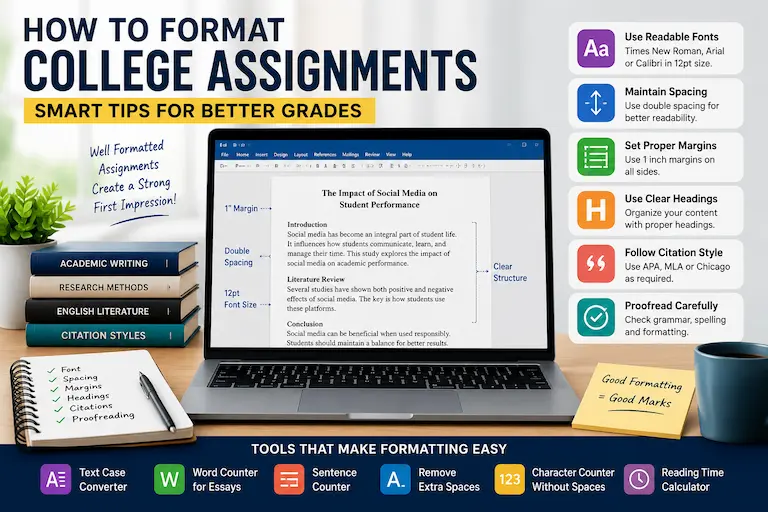
Why Assignment Formatting Matters
Formatting affects how professors perceive your work before they even begin reading.
A clean assignment looks:
- professional
- organized
- readable
- academically credible
Poor formatting creates:
- visual clutter
- readability problems
- inconsistent structure
- lower engagement
Proper formatting also improves proofreading and helps instructors evaluate assignments more efficiently.
Some courses give marks for formatting directly. Look at your rubric: if it lists “presentation”, “formatting” or “referencing”, those marks are the easiest to protect, because they depend on careful checking rather than on new ideas.
Standard Formatting Rules for College Assignments
Most universities follow similar formatting expectations regardless of subject.
Use Readable Fonts
The safest academic fonts include:
- Times New Roman
- Arial
- Calibri
Recommended font size:
- 12pt for body text
- headings: usually the same size as the body text (see the heading tips below), unless your instructor asks for a larger size
Avoid decorative or stylized fonts because they reduce readability.
Each style guide names its own fonts. APA 7 accepts several, including 12 pt Times New Roman and 11 pt Calibri, as long as you use one font throughout the paper. MLA and Chicago ask for a clear, readable 12 pt font such as Times New Roman.
Maintain Proper Line Spacing
Most colleges require:
- double spacing
- consistent paragraph spacing
- aligned text formatting
Incorrect spacing is one of the most common academic formatting mistakes.
You can quickly fix spacing issues using a professional and free online Remove Extra Spaces tool.
Apply double spacing to the whole document, including the reference list in APA and MLA. In Word and Google Docs, also set the space before and after each paragraph to 0. Otherwise your paragraphs get extra gaps that the style guides do not allow.
Set Standard Margins
Academic documents usually require:
- 1-inch margins on all sides
This creates clean document alignment and consistent printing format.
Use Proper Paragraph Structure
Each paragraph should:
- focus on one main idea
- maintain consistent indentation
- avoid oversized text blocks
Readable paragraph formatting improves comprehension significantly.
Use the paragraph setting for the half-inch first-line indent. Do not press the space bar several times. Spaces typed by hand are a common cause of uneven text.
Best Heading Structure for Assignments
Headings help organize academic writing logically.
Common assignment structure:
- Introduction
- Literature Review
- Methodology
- Discussion
- Conclusion
- References
Consistent heading formatting improves document navigation and professionalism.
A Text Case Converter can help standardize assignment headings quickly and accurately.
Use the real heading styles in Word or Google Docs (Heading 1, Heading 2) instead of only making text bigger or bolder. The same level should always look the same, and a Level 2 heading should always sit under a Level 1 heading.
How to Format College Assignments in APA Style
APA formatting is commonly used in:
- psychology
- education
- social sciences
- business studies
APA Formatting Rules
APA assignments typically require:
- title page
- double spacing
- 12pt Times New Roman (or another font APA accepts, such as 11pt Calibri)
- page numbers
- reference page
APA Heading Example
Effects of Social Media on Student Performance
APA title capitalization is important for academic professionalism.
APA Student Title Page
APA 7 student papers normally start with a title page. It contains:
- the paper title, in bold, centered, a few lines down from the top, with the major words capitalized
- your name
- your department and university
- the course number and name
- your instructor’s name
- the assignment due date
The page number goes in the top right corner of every page. A running head is not required for student papers unless your instructor asks for one.
APA Heading Levels at a Glance
APA uses up to five heading levels. Every level uses the same font size as the body text. The level is shown by bold, italics, position and punctuation, not by bigger letters. Short papers often need only Level 1, or Levels 1 and 2.
| Level | How it looks | Example |
|---|---|---|
| 1 | Centered, bold, Title Case | Research Methods |
| 2 | Flush left, bold, Title Case | Survey Design |
| 3 | Flush left, bold italic, Title Case | Question Wording |
| 4 | Indented, bold, Title Case, ends with a period; the text starts on the same line | Pilot Test. |
| 5 | Indented, bold italic, Title Case, ends with a period; the text starts on the same line | Response Rate. |
If your headings use mixed capitalization, the Text Case Converter can help make them consistent before you check them against the Title Case rule.
APA Reference List Basics
- start the list on a new page after the last page of text
- put the label “References” at the top, centered and bold
- list the entries in alphabetical order
- use a 0.5-inch hanging indent, so the first line sits at the margin and the other lines are indented
- keep it double-spaced, with no extra blank lines between entries
How to Format College Assignments in MLA Style
MLA style is common in:
- literature
- humanities
- language studies
MLA Formatting Includes
- student name
- instructor name
- course title
- date
- double spacing
- Works Cited page
MLA emphasizes readability and citation consistency.
MLA First Page Example
MLA does not need a separate title page unless your instructor asks for one. Instead, the first page starts with four lines at the top left, then the centered title. Your last name and the page number go in the top right header of every page. Here is the layout with placeholder details:
Lastname 1

Your Full Name
Professor Smith
ENG 101
29 October 2026

      Effects of Social Media
      on Student Performance

    Your first paragraph starts here,
    with a half-inch indent...
Write the title in the same font and size as the rest of the paper, with no bold, italics, underline or quotation marks. The date is written as day, month, year. The Works Cited list starts on a new page, with the title “Works Cited” centered and a 0.5-inch hanging indent.
How to Format College Assignments in Chicago Style
Chicago style is widely used for:
- history
- publishing
- advanced research writing
It uses:
- footnotes
- bibliography pages
- structured citations
Chicago formatting tends to be more detailed than APA or MLA.
Chicago Layout Basics
Chicago has two systems: notes and bibliography (common in history and the humanities) and author-date (common in the sciences). Ask your instructor which one your course uses. Most class papers share these basics:
- a title page, with the title about one-third of the way down the page and your name, course and date several lines below it
- a readable 12 pt font, 1-inch margins and double-spaced text
- numbered footnotes or endnotes, in the order they appear
- a Bibliography on a new page, with the title “Bibliography” centered at the top and the entries in alphabetical order
- each Bibliography entry flush left with a 0.5-inch hanging indent, single-spaced inside the entry and with one blank line between entries
APA vs MLA vs Chicago: Quick Comparison
If your instructor names a style but gives no details, this table shows the main differences at a glance.
| Feature | APA (7th edition) | MLA (9th edition) | Chicago / Turabian |
|---|---|---|---|
| Title page | Yes, for student papers | No, unless asked. A four-line block goes at the top of page 1 | Usually yes |
| Page numbers | Top right | Top right, after your last name | Follow your instructor (top right is common) |
| In-text citation | Author and year, like (Author, 2024) | Author and page, like (Author 45) | Footnotes or endnotes (notes and bibliography system) |
| List at the end | References | Works Cited | Bibliography |
| Entry layout | 0.5-inch hanging indent, double-spaced | 0.5-inch hanging indent, double-spaced | 0.5-inch hanging indent, single-spaced inside each entry, blank line between entries |
| Common subjects | Social sciences, education, psychology, business | Literature, humanities, language studies | History, publishing, advanced research writing |
Last checked: October 2026. Style guides are updated from time to time, and many universities add their own rules, so use this table as a starting point and keep your assignment brief open next to it.
Quick Setup in Microsoft Word and Google Docs
You can set up the whole document before you start writing. These are the settings most college assignments need. Menu names change a little between versions, so look for the same words in your own menu.
| Setting | Microsoft Word | Google Docs |
|---|---|---|
| Margins | Layout > Margins > Normal (1 inch on all sides) | File > Page setup > Margins (1 inch) |
| Font | Select all (Ctrl+A), then choose the font and size on the Home tab | Select all (Ctrl+A), then choose the font and size in the toolbar |
| Double spacing | Home > Line and Paragraph Spacing > 2.0 | Format > Line & paragraph spacing > Double |
| No extra gap between paragraphs | Layout > Spacing: Before 0 pt, After 0 pt | Format > Line & paragraph spacing > Custom spacing: Before 0, After 0 |
| First-line indent | Home > Paragraph dialog box > Special > First line > 0.5″ | Format > Align & indent > Indentation options > Special indent > First line > 0.5″ |
| Page number | Insert > Page Number > Top of Page > Plain Number 3 (top right) | Insert > Page numbers > choose a top-right style |
| Headings | Home > Styles > Heading 1, Heading 2 | Format > Paragraph styles > Heading 1, Heading 2 |
Common Formatting Mistakes Students Make
Many students lose marks because of avoidable formatting issues.
Extra Spaces
Extra spaces are hard to see on a web page, so here is an example in a fixed-width box where every space shows:
Incorrect: The  results  show   a clear trend .
Correct:   The results show a clear trend.
Common causes are typing two spaces after a full stop, using the space bar instead of the indent setting, and pasting text from another source. APA and MLA both use one space after a full stop. To find the problem, use Find and Replace in Word or Google Docs: search for two spaces and replace them with one, and repeat until nothing is replaced. You can also paste the text into the Remove Extra Spaces tool.
Using a professional spacing cleanup tool helps remove formatting inconsistencies instantly.
Inconsistent Fonts
Changing fonts throughout a document creates an unprofessional appearance.
Always maintain one font style consistently.
Poor Heading Formatting
Incorrect heading hierarchy confuses readers and weakens structure.
Here is a before and after example of two headings in an APA paper:
| Before | After |
|---|---|
| RESEARCH METHODS (all capitals, left-aligned, underlined) | Research Methods (centered, bold, Title Case) |
| survey design: (lowercase, ends with a colon) | Survey Design (flush left, bold, Title Case) |
| Heading typed by hand, left alone at the bottom of a page | Heading made with a real heading style, kept with the paragraph that follows it |
Copy-Paste Formatting Problems
Text copied from:
- websites
- PDFs
- Google Docs
- AI tools
often imports hidden formatting.
This can create:
- broken line spacing
- strange fonts
- inconsistent paragraph formatting
Always clean pasted text before submission.
If formatting changes when you copy content from another document, website, or PDF, see our guide on Why Formatting Breaks When Copy Pasting Text to understand the common causes and solutions.
Best Tools for Formatting College Assignments
College students can use targeted text tools to save time, check assignment requirements, and keep their final work clean and consistent.
Remove Extra Spaces
Copied text can introduce double spaces and inconsistent spacing into an assignment. The Remove Extra Spaces tool can clean these problems quickly before you finalize your document.
- remove double spaces
- clean unwanted spaces in copied text
- make spacing more consistent
Word Counter for Essays
When an assignment has a required word range, the Word Counter for Essays helps you check the final length before submission.
- check assignment word count
- stay within required word limits
- review the final length after editing
Text Case Converter
If headings or subheadings have inconsistent capitalization, the Text Case Converter can quickly standardize their capitalization without retyping the text.
- standardize heading capitalization
- correct inconsistent text case
- format titles and subheadings consistently
Sentence Counter
Clear sentence structure makes academic writing easier to follow. The Sentence Counter can help you review sentence length and paragraph structure while editing an assignment.
- review sentence structure
- check paragraph development
- identify unusually long or short sentences
Character Counter Without Spaces
Some assignments, abstracts, titles, or short-response tasks have character limits. The Character Counter Without Spaces helps you check text length without counting spaces.
- check assignment titles
- measure abstracts or short responses
- stay within character limits
How Formatting Improves Academic Performance
Clean formatting improves:
- readability
- organization
- visual presentation
- ease of evaluation
Well-formatted assignments are easier to read and evaluate because headings, paragraphs, spacing, and other visual elements are presented consistently.
If you find unusual spacing in a college assignment, see our guide on How to Fix Weird Spacing in Word Documents for practical solutions.
How to Improve Readability in College Assignments
Readability directly impacts academic quality.
Use Short Paragraphs
Large text blocks overwhelm readers.
Avoid Excessive Formatting
Too many:
- bold words
- italics
- colors
- font changes
make assignments harder to read.
Use Clear Transitions
Logical flow improves comprehension and professionalism.
Proofread Carefully
Always review:
- spacing
- alignment
- headings
- grammar
- punctuation
before submission.
Best Practices for Online Assignment Submission
Most universities now use platforms like:
- Blackboard
- Moodle
- Canvas
- Google Classroom
Formatting problems can appear after uploading assignments.
Submission Tips
- Save assignments as PDF when possible
- Recheck formatting after upload
- Avoid unusual fonts
- Use standard spacing
Upload the file type your instructor asks for. If the brief asks for a Word file, do not convert it to PDF. Give the file a clear name, such as LastName_CourseCode_Assignment1, unless the course has its own naming rule. After uploading, open the submitted file once and check that the fonts, page breaks and reference list look the same as on your own computer.
9-Point Final Checklist Before You Submit
Go through these nine checks in order. They take about ten minutes and catch the mistakes that cost the most marks.
- Read the brief again. Note the word limit, file type, citation style and any rule that differs from the defaults in this guide.
- One font, one size. Check that pasted text did not bring in a second font.
- Double spacing and no extra paragraph gaps. Select all and look at the Paragraph settings.
- 1-inch margins on every side.
- Same heading, same look. Every heading of one level uses exactly the same formatting.
- Title page or first-page block as your style requires, with page numbers on every page.
- Citations match the reference list. Every in-text citation has an entry, and every entry is cited. Check the hanging indent and the alphabetical order.
- Clean the text. Remove double spaces and stray line breaks, then check the length with the Word Counter for Essays.
- Check the saved file. Save it in the file type your instructor asks for, open it once, and look at every page.
Academic Formatting Resources
Students should follow official formatting guides for accuracy.
Helpful resources include:
These resources explain professional academic formatting standards used worldwide.
The Psychology Behind Clean Assignment Formatting
An instructor sees the layout of your pages before reading a single sentence, so headings, spacing and margins shape the first impression.
Clean formatting signals:
- professionalism
- organization
- academic discipline
- attention to detail
Messy formatting creates cognitive friction and weakens overall presentation.
This is especially important in competitive academic environments across the USA and UK.
Final Thoughts on How to Format College Assignments
Understanding How to Format College Assignments properly can significantly improve academic presentation, readability, and grading outcomes.
Strong formatting helps students create:
- organized essays
- professional research papers
- readable reports
- polished academic documents
Whether you are preparing:
- essays
- dissertations
- coursework
- reports
- case studies
- research assignments
consistent formatting improves readability and academic credibility.
The smartest students combine:
- proofreading
- formatting standards
- readability optimization
- automated text tools
to create polished assignments efficiently.
Instantly Improve Assignment Formatting With a Remove Extra Spaces Tool
Want the fastest way to clean assignment formatting professionally?
Use a professional and free online tool
This tool will
- remove unnecessary spaces instantly
- fix formatting inconsistencies
- improve readability
- clean copied text
- create polished academic documents
It is one of the most valuable tools for students, researchers, bloggers, and academic writers.
FAQs About How to Format College Assignments
How to format college assignments correctly?
To format college assignments correctly, use readable fonts, proper spacing, consistent headings, correct margins, and approved citation styles like APA or MLA.
What font is best for college assignments?
Times New Roman 12 pt is the safest default for most instructors. APA 7 also accepts 11 pt Calibri and a few other fonts, and MLA and Chicago ask for a readable 12 pt font. Always follow your instructor’s or institution’s formatting requirements when they differ from general APA, MLA, or Chicago guidelines.
Why is formatting important in assignments?
Formatting improves readability, professionalism, organization, and grading presentation.
What is the best tool for how to format college assignments?
A Remove Extra Spaces tool is one of the best solutions for cleaning formatting inconsistencies quickly.
Which citation style is most common for college assignments?
APA, MLA, and Chicago styles are the most widely used academic formatting systems.
How do I fix spacing issues in assignments?
You can manually adjust spacing or use a professional online spacing cleanup tool to fix formatting instantly.
Do I need a title page for a college assignment?
It depends on the style and on your instructor. APA student papers normally have one. MLA does not need a separate title page: your name, instructor, course and date go at the top of page 1. Chicago class papers usually have one. If your brief says otherwise, follow the brief.
Should headings be bigger than the body text?
Usually not. APA uses the same font size for every heading and the body text, and shows the level with bold, italics and position. Only make headings bigger if your instructor asks for it.
Should I submit my assignment as a PDF or a Word file?
Submit the format your instructor asks for. If the choice is yours, a PDF keeps fonts and page breaks the same on every device. Choose a Word file if your instructor will add comments or tracked changes.
Do references count toward the word limit?
Rules differ between courses. Some exclude the reference list, some exclude only the in-text citations, and some count everything. Check the brief, then use the Word Counter for Essays to check your length with and without the reference list.
What is the difference between APA, MLA and Chicago formatting?
APA uses author-date citations and a References list, and student papers normally have a title page. MLA uses author-page citations and a Works Cited list, and starts with a name block on page 1. Chicago uses footnotes or endnotes with a Bibliography, and some subjects use its author-date system instead. The comparison table earlier in this guide shows the details.