
How to Count Characters Without Spaces Correctly
9 Powerful Ways: How to Count Characters Without Spaces Correctly
How to Count Characters Without Spaces Correctly is useful for writers, students, SEO professionals, developers, marketers, and anyone working with text-based limits. Whether you are checking an SEO title, preparing an academic assignment, writing social media content, or working with a software input limit, knowing how character counts are calculated helps you meet requirements more accurately.
Character-counting rules can vary between tools and platforms. Some measurements include spaces, while others report characters without spaces. Punctuation, symbols, line breaks, and emojis can also affect the result depending on how the counting system processes them.
In this guide, you will learn how to count characters without spaces correctly, how different tools report character counts, when this measurement is useful, and how to check your text efficiently.
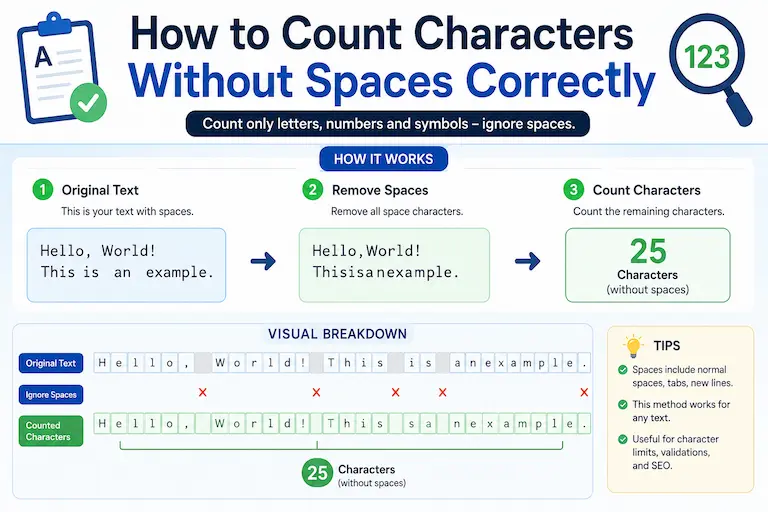
What Does “Characters Without Spaces” Mean?
Characters without spaces means counting the characters in a piece of text while excluding the space characters between words. Depending on the counting method, letters, numbers, punctuation marks, and symbols may still be included.
Example
Consider this sentence:
“Digital marketing matters”
Character Count With Spaces
25 characters
Character Count Without Spaces
23 characters
The two spaces between the three words account for the difference. This example shows why it is important to know whether a tool or platform includes spaces in its measurement.
Character counts can be useful when working with:
- SEO titles and page titles
- Meta descriptions
- Social media content
- Academic submissions
- SMS and messaging content
- Database fields
- Software input validation
For an instant count, use the Character Counter Without Spaces to check your text while you edit.
Why Counting Characters Without Spaces Matters
Character counting becomes important whenever a form, editor, publication system, or platform has a defined text limit.
A character count can help you:
- Check whether text fits within a stated limit
- Compare different versions of a title or message
- Prepare concise copy for digital platforms
- Review academic or application requirements
- Check text before entering it into software with input restrictions
The exact requirement depends on the platform or document. Always check the relevant instructions rather than assuming that a particular character limit applies everywhere.
How to Count Characters Without Spaces Correctly
There are several reliable ways to calculate characters without spaces. The best method depends on the amount of text and the tool available to you.
Manual Counting
You can remove the spaces from a short piece of text and count the remaining characters manually.
This can work for a very short phrase, but it becomes impractical and more error-prone as the amount of text increases.
Using Microsoft Word
Microsoft Word provides document statistics that include character counts. Its Word Count feature can show characters and other document statistics, making it useful for checking longer documents. Microsoft Support explains Word’s current Word Count features.
Steps:
- Open your document.
- Open the Word Count information.
- Review the character statistics.
- Check the characters-without-spaces figure when available.
Using Google Docs
Google Docs provides character statistics through its Word Count feature, including characters without spaces. This makes Google Docs useful for checking both word and character counts without relying on an extension. Google Docs Help explains its current Word Count feature.
Steps:
- Open your Google Docs document.
- Click Tools.
- Select Word count.
- Review the character count, including characters without spaces.
Using an Online Character Counter
An online character counter is convenient when you want to check a piece of text without opening a separate document editor.
Depending on the tool, you may be able to review:
- Characters with spaces
- Characters without spaces
- Words
- Sentences
- Paragraphs
Character Counter Without Spaces
For this specific task, the Character Counter Without Spaces is the most directly relevant TextToolPro tool. It lets you paste your text and review the character count without spaces while editing.
Industries That Use Character Counting Without Spaces
SEO and Digital Marketing
SEO professionals often review the length of titles, descriptions, ad copy, and other text elements.
- SEO titles
- Meta descriptions
- URL slugs
- PPC ad copy
Search-result titles and snippets are displayed within available screen space, so a character count can be useful during drafting. However, Google does not prescribe a universal character limit for title elements or meta descriptions; display can vary by device and query. Google Search Central’s title-link guidance and snippet guidance explain the current approach.
Social Media Marketing
Social platforms use different limits for different types of content, and some platforms offer different limits depending on the account or feature.
- X posts
- Instagram bios and captions
- TikTok captions
- LinkedIn profile fields and posts
Because these limits can change, verify the current requirement on the platform before publishing content that is close to a limit.
For a deeper look at platform-specific limits, these related guides may help:
- Why Character Limits Matter on Social Media
- Instagram Caption Character Limit Guide
- LinkedIn Post Character Limit in 2026
Academic Writing
Some academic applications, forms, and submission systems may specify character limits instead of, or in addition to, word limits. Always follow the exact requirements provided by the institution or application.
Software Development
Developers may need to account for character restrictions when working with:
- Database fields
- API parameters
- Input validation
- Form fields
- Text-processing systems
Difference Between Characters With and Without Spaces
These two measurements are easy to confuse, but they answer different questions.
| Type | Spaces Included? |
|---|---|
| Characters With Spaces | Yes |
| Characters Without Spaces | No |
Why This Difference Matters
If a requirement specifically asks for characters without spaces, using a total that includes spaces can give you the wrong measurement.
For SEO titles and search snippets, however, do not rely on a fixed character number as a guarantee of how Google will display the text. Google can truncate or rewrite title links and snippets according to available display space and other factors.
Best Practices for Accurate Character Counting
Remove Unnecessary Spaces
Extra spaces can make text harder to clean and review before counting. If your draft contains repeated spaces, use the Remove Extra Spaces tool to clean the text before performing your final count.
Use a Dedicated Counting Tool
For anything longer than a short phrase, an automated character counter is more practical than counting characters manually. It reduces the chance of overlooking characters while editing.
Double-Check Platform Requirements
Different systems may handle spaces, line breaks, emojis, symbols, or other characters differently. Before submitting or publishing, check the requirements of the specific platform or form.
- Spaces
- Line breaks
- Emojis
- Special characters
- Formatting characters
When the requirement comes from a platform, its current documentation should take priority over a general character-counting guide.
Why Character Limits Matter in SEO
Character counting can help SEO professionals draft concise titles and descriptions, but character length alone does not determine search performance.
SEO Title Length
Google does not publish a universal character limit for the HTML <title> element. Instead, title links can be truncated when necessary to fit the available display space, and Google may generate the title link from several sources. Google Search Central explains how title links are generated.
Meta Description Length
Google also does not set a fixed character limit for meta descriptions. Search-result snippets can be truncated as needed to fit the available display space, so a character counter should be treated as a drafting aid rather than a guarantee of the final display. Google Search Central’s snippet documentation provides the current guidance.
Accurate counting can still help you:
- Compare alternative titles
- Keep important wording concise
- Review draft length
- Check text against known platform requirements
Character Counting for Social Media
Social media platforms use different limits for different types of content, and some platforms offer different limits depending on the account or feature.
Examples of Platform Limits
| Platform or Feature | Example Limit |
|---|---|
| X standard post | 280 characters |
| X Premium longer post | Up to 25,000 characters |
| Instagram bio | 150 characters |
| LinkedIn profile headline | 220 characters |
X’s current help documentation confirms a 280-character limit for standard posts and describes longer posts as an X Premium feature, with longer posts currently reaching up to 25,000 characters. See X’s current posting documentation.
Platform limits can change, so verify the current requirements before relying on a number for a time-sensitive publication or submission.
Character counters are useful for drafting, but the platform itself remains the final authority when a limit is enforced at publication.
Common Mistakes When Counting Characters Without Spaces
Forgetting Extra Spaces
Spaces may be visually difficult to notice, especially when they appear at the beginning, end, or between words. Clean the text before comparing different versions.
Ignoring How Emojis Are Counted
Emoji counting can vary because some visible emojis are represented by more than one Unicode code point. If an exact platform limit matters, compare the result with the platform or tool that will ultimately process the text.
Confusing Words With Characters
Word count measures words, while character count measures individual characters according to the counting method being used. They are different metrics and should not be treated as interchangeable.
Assuming Every Tool Counts the Same Way
Different applications can handle spaces, line breaks, emojis, and special characters differently. If the result matters for a formal submission or platform limit, verify the counting method being used.
How Writers Benefit From Character Counters
Character counters can help writers:
- Review text length
- Meet stated character requirements
- Compare alternative wording
- Create concise digital copy
- Check formatting before submission
For writers working on academic, marketing, or digital content, a character counter can make length checking faster and easier.
Related Text Tools That Improve Writing Accuracy
Character counting is the primary task in this guide, but a few related tools can help with the surrounding editing process.
Character Counter Without Spaces
The Character Counter Without Spaces is the primary tool for checking the exact measurement discussed in this guide.
Word Counter for Essays
When an assignment or application specifies a word limit instead of a character limit, the Word Counter for Essays provides the complementary measurement. This is particularly useful when you need to compare word-count and character-count requirements.
Sentence Counter
For longer pieces of writing, the Sentence Counter can help you review sentence density and identify sections that may need restructuring.
Remove Extra Spaces
If your text contains accidental double spaces or inconsistent spacing, the Remove Extra Spaces tool can clean the draft before you perform the final character count.
Why Concise Writing Matters Online
Digital readers often encounter content on small screens and in interfaces with limited display space. Concise writing can make information easier to scan, but shorter is not automatically better in every situation.
Good concise writing focuses on removing unnecessary wording while preserving the information the reader needs.
- Clearer communication
- Easier scanning
- Better mobile readability
- More efficient editing
These principles apply to writers and digital publishers regardless of whether their audience is in the USA, UK, Canada, Australia, or another market. The important factor is the content requirement and the audience’s needs, not the reader’s location.
Character Counting in Professional Communication
Character limits can matter when preparing:
- Email subject lines
- Push notifications
- SMS campaigns
- Advertising copy
- Product descriptions
- Form fields
In each case, the relevant limit depends on the specific service or system. Instead of assuming that one universal number applies, check the requirements for the platform or application you are using.
Best Tool to Count Characters Without Spaces Correctly
If your primary goal is to check characters without spaces, a dedicated character counter is the most direct solution.
Recommended Tool
Character Counter Without Spaces
Use it to:
- Check characters without spaces
- Compare text versions
- Review character-based requirements
- Prepare concise digital copy
- Check text before submitting or publishing
FAQs
How to Count Characters Without Spaces Correctly?
You can count characters without spaces using Microsoft Word, Google Docs, or a dedicated online character counter. For longer text, an automated tool is generally more practical than counting characters manually.
Why Is Character Count Without Spaces Important?
It is useful when a requirement specifically asks for characters without spaces, such as certain forms, text-processing tasks, or content limits. The exact requirement should always be checked with the relevant platform or institution.
Does Google Count Spaces in SEO Titles?
Google does not publish a universal character limit for SEO titles. Spaces are part of the text, but Google evaluates title links based on available display space and other factors. A character counter can help with drafting, but it cannot guarantee how a title will appear in search results.
What Is the Best Tool to Count Characters Without Spaces Correctly?
A dedicated Character Counter Without Spaces is the most directly relevant tool for checking this measurement.
Are Emojis Counted as Characters?
Emoji counting can vary because some visible emojis are represented by multiple Unicode code points. If a precise limit matters, verify the result with the platform or application that will process the text.
What Is the Difference Between Word Count and Character Count?
Word count measures words, while character count measures characters according to the counting method being used. A text can therefore have a low word count but a much higher character count.
Final Thoughts
Understanding How to Count Characters Without Spaces Correctly is useful for writers, students, marketers, developers, and anyone who works with character-based requirements.
Character counting can help with:
- Content requirements
- Social media limits
- Academic submissions
- Professional communication
- Software input restrictions
- SEO drafting
The most reliable approach is to identify exactly what the requirement counts, use an appropriate counting tool, and verify the final text against the platform or institution’s current instructions.
When you need to check characters without spaces quickly, use the Character Counter Without Spaces and review the final result before publishing or submitting your text.