
7 Powerful Reasons Why Character Limits Matter on Social Media for Better Engagement
Why Character Limits Matter on Social Media is an important question for content creators, marketers, bloggers, students, and businesses. Social platforms place limits on many types of content, and those restrictions encourage writers to communicate within a defined amount of space.
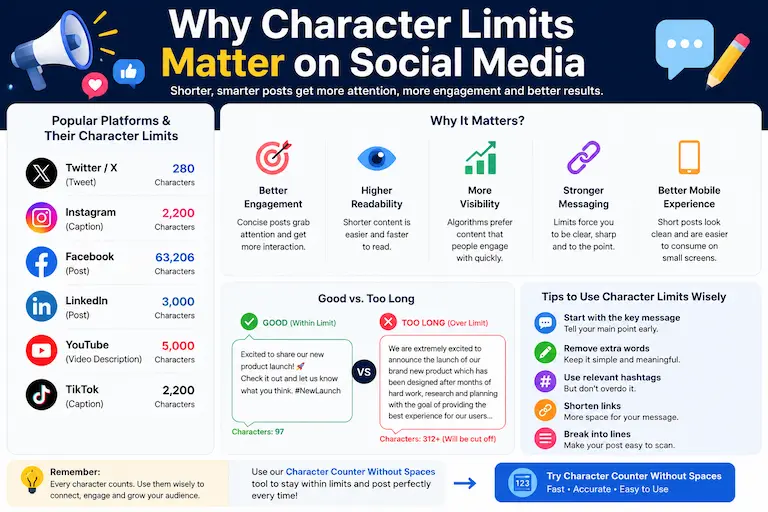
Quick answer: character limits matter because every platform gives you a different amount of space, and writing for that space pushes you to put the main point first, cut filler and plan your content before you publish. Current examples are 280 characters for a standard X post, 3,000 for LinkedIn, 2,200 for an Instagram caption and 4,000 for a TikTok caption. Limits change, so use the table below as a starting point and confirm in the app. Last checked: October 2026.
Whether you are posting on X, Instagram, LinkedIn, Facebook, TikTok, or Threads, understanding the relevant character limit can help you plan captions, posts, headlines, and other short-form content more effectively.
Character limits do not automatically make content more engaging. However, they can encourage concise writing, make editing more deliberate, and help creators focus on the information that matters most to their audience.
This guide explains why character limits matter on social media, how they affect readability and content planning, and how creators in the USA, UK, Canada, and other markets can use character limits strategically.
What Are Character Limits on Social Media?
Character limits are restrictions on how much text can be entered into a particular social media field, such as a post, caption, profile field, or message.
A character may include letters, numbers, spaces, punctuation, symbols, or other text elements, depending on how the platform calculates its limit.
Not every platform uses the same limit, and a single platform may have different limits for different features. Always check the platform’s current documentation when an exact limit matters.
Examples of Social Media Character Limits
| Platform or Feature | Current Example |
|---|---|
| X standard post | Up to 280 characters |
| X Premium longer post | Up to 25,000 characters |
| LinkedIn post | 3,000 characters |
| Instagram caption | Up to 2,200 characters |
| TikTok caption | Up to 4,000 characters |
X currently documents a 280-character limit for standard posts and allows Premium subscribers to create longer posts of up to 25,000 characters. X Help explains its current post types and limits.
LinkedIn currently states that posts have a 3,000-character limit. LinkedIn Help provides the current post limit.
The Instagram and TikTok figures are the limits widely reported at the time of writing (October 2026). Neither platform lists them on a single help page that we could link to, so confirm the number in the app’s caption box before you publish. Because social platforms can change their features and limits, treat specific numbers as current platform information rather than permanent rules.
You can check the length of your own social media copy with the Character Counter Without Spaces.
Social Media Character Limits by Platform (Quick Reference)
Use this table to compare the main limits side by side. The last column links to our full guide where we have one.
| Platform | Main limit | Visible before “more” (approximate) | Full guide |
|---|---|---|---|
| X (Twitter) | 280 for a standard post. X lists longer posts for Premium subscribers, up to 25,000. | Standard posts are not cut off | Twitter Character Limit Explained |
| 3,000 for a post | Reports vary, roughly 140 to 210 characters depending on device | LinkedIn Post Character Limit in 2026 | |
| 2,200 for a caption, with up to 5 hashtags per post or Reel | About 125 characters | Instagram Caption Character Limit | |
| TikTok | 4,000 for a caption | About 100 characters | See the TikTok section below |
| 63,206 for a post (widely reported) | Varies by device | See the Facebook section below | |
| Threads | 500 for a post; text attachments are reported to allow up to 10,000 | Not reported | See the Threads section below |
Last checked: October 2026. The “visible before more” figures come from preview tools and observation, not from platform help pages, so treat them as a guide. The Facebook and Threads limits are widely reported but not listed on a single help page we could link to.
Do Spaces Count Toward the Limit?
On the platforms above, spaces, punctuation and line breaks use part of the limit. A counter that leaves spaces out, such as the Character Counter Without Spaces, always shows a lower number than the platform will count.
Worked example: an X post has 45 words and 240 characters without spaces. Between 45 words there are about 44 spaces, so the real count is about 284. That is 4 over the 280 limit, even though 240 looks safe. A simple rule is to add one character for every word, then check the final result in the app.
Why Character Limits Matter on Social Media for Engagement
Character limits can influence how creators structure their messages, but they do not guarantee higher engagement. Their main value is that they require writers to work within a defined amount of space.
1. They Encourage Concise Communication
A limited amount of space encourages creators to identify the main point and remove wording that does not contribute to the message.
- Focus on the main idea
- Remove unnecessary wording
- Present the key information earlier
- Make editing more deliberate
2. They Encourage Stronger Hooks
When space is limited, the opening line becomes especially important because it has to establish the topic quickly.
For example:
- Less direct: “Today I want to discuss several important points about productivity and time management.”
- More direct: “Your phone may be disrupting your productivity.”
The second version communicates its main idea immediately without requiring a long introduction.
3. They Can Improve Readability
Concise writing can make individual posts easier to scan, particularly when readers encounter many pieces of content in a feed.
Good social media writing often benefits from:
- Short paragraphs
- Clear wording
- Strong structure
- One main idea per section
Character limits alone do not guarantee readability. Sentence structure, vocabulary, formatting, and the quality of the message also matter.
4. They Help Creators Edit More Efficiently
A character limit gives writers a measurable constraint. If a post is too long, the writer can remove repetition, replace wordy phrases, or reorganize the message instead of adding more information.
5. They Support Platform-Specific Content Planning
Different platforms provide different amounts of space. Understanding those limits helps creators decide whether an idea should become a short post, a longer post, a caption, an article, or a series of posts.
6. They Help Keep Messages Focused
When every character matters, writers have an incentive to prioritize the information most relevant to the audience.
This can be particularly useful for:
- Calls to action
- Announcements
- Educational tips
- Marketing messages
- Professional updates
7. They Make Length Easier to Manage
Instead of guessing whether a post fits a platform’s requirements, creators can measure the text before publishing it.
This is especially useful when a post is close to the platform’s stated limit and every remaining character matters.
Why Character Limits Matter on Social Media for Readability
Social media feeds are designed for quick browsing. Concise posts can make individual messages easier to scan, although engagement still depends on factors such as topic, audience, timing, content quality, and platform-specific distribution.
Writers can improve readability by combining a suitable character length with:
- Short and clear sentences
- Useful paragraph breaks
- Specific wording
- Relevant examples
- A clear purpose
A Sentence Counter can help you review the number of sentences in longer social media drafts and identify sections that may need restructuring.
Why Character Limits Matter on Social Media for Brand Messaging
Character restrictions can help brands maintain a consistent message across short-form content.
When space is limited, brands can focus on:
- The main benefit
- The intended audience
- The desired action
- The brand’s tone
Short slogans and memorable phrases can be effective examples of concise communication. However, their success depends on factors beyond length, including brand recognition, relevance, positioning, and audience response.
For example, well-known slogans such as “Just Do It” demonstrate how a short phrase can communicate a broader brand message. The length of a slogan alone, however, does not explain why a campaign succeeds.
If you want to learn how character counting works in more detail, read this related guide:
How to Count Characters Without Spaces Correctly
Why Character Limits Matter on Social Media for SEO
Character limits and SEO are related to content planning, but a character limit itself is not a direct SEO ranking factor for social media posts.
Concise Social Copy Can Support Clickable Messages
Concise wording can make a call to action or link introduction easier to understand. However, click-through rate depends on many factors, including the offer, audience, topic, creative, placement, and platform.
Character Counts Help With SEO-Related Drafting
Character counters can also help when preparing related SEO content such as titles, descriptions, and social copy. They should be treated as drafting tools rather than guarantees of search-result display.
Google does not use a universal character limit for search-result title links or snippets. Display can vary according to available space and other factors. Google Search Central explains title-link generation, while its snippet documentation explains how search-result snippets are generated.
How Different Social Platforms Use Character Limits
X
X currently allows standard posts of up to 280 characters. X Premium subscribers can create longer posts of up to 25,000 characters. See X’s current posting guidance.
X’s own help pages are not fully consistent about longer posts. The Premium page says up to 25,000 characters, but the How to Post page also mentions 4,000 in one section. Check the composer on your own account before you rely on a long post. Last checked: October 2026.
LinkedIn currently states that a post can contain up to 3,000 characters. If content exceeds that limit, LinkedIn directs users toward its article-publishing option. See LinkedIn’s current post guidance.
Instagram captions can contain up to 2,200 characters. Only the first few lines appear in the feed before the “more” link, so put the most important words at the start. Instagram also sets separate limits for other fields, such as profile bios, so check the app when you are editing one of those.
Hootsuite’s caption preview tool uses about 125 characters as the feed cut-off. Since December 2025, Instagram has also limited posts and Reels to five hashtags.
TikTok
TikTok captions can contain up to 4,000 characters, after the limit was raised from 2,200. Like Instagram, TikTok shows only the first part of a long caption before the “more” link, so lead with the main point. If your caption is close to the limit, check the number in the app before posting.
Hootsuite’s caption preview tool uses about 100 characters as the visible part of a TikTok caption. Some scheduling tools may still apply an older, lower limit, so test a long caption in the app itself.
Facebook and Threads
Facebook and Threads also have different text limits depending on the content type. When a precise character limit matters, use the platform’s current interface or documentation as the final reference.
Facebook posts are widely reported to allow up to 63,206 characters. Threads posts are limited to 500 characters, and text attachments are reported to allow up to 10,000. These are widely reported figures, so confirm them in the app before you rely on them. Last checked: October 2026.
Psychological Benefits of Concise Social Media Writing
Concise writing can reduce the amount of information a reader has to process at once. This does not mean that shorter content is always better, but removing unnecessary wording can make a message easier to understand.
Lower Unnecessary Cognitive Load
A clearly structured message can be easier to process than a paragraph filled with repetition or unrelated details.
Clearer Main Ideas
Working within a character limit encourages writers to identify the central point before adding supporting information.
More Focused Calls to Action
A concise post can leave enough space for a clear call to action without burying it inside unnecessary wording.
Why Businesses Need Character Count Tools
Businesses, marketers, creators, and students may need to check character counts when preparing:
- Social media posts
- Captions
- Advertising copy
- Headlines
- Short announcements
- SMS messages
- Profile descriptions
A dedicated counter makes it easier to identify when a draft exceeds a stated requirement and gives you a measurable starting point for editing.
Best Tools for Managing Social Media Text
The following tools have different roles in the editing process. The first is directly related to character limits, while the others help with specific aspects of preparing social media copy.
Character Counter Without Spaces
The Character Counter Without Spaces is the primary tool for checking the length of social media copy when you need to know the character count without spaces.
Text Case Converter
Social media posts often use headings, hooks, labels, and short promotional phrases. The Text Case Converter can help standardize capitalization when you are editing those text elements.
Sentence Counter
For longer LinkedIn posts, educational content, or multi-paragraph captions, the Sentence Counter can help you review sentence density and structure.
Remove Extra Spaces
Before publishing or checking a final character count, clean accidental double spaces and inconsistent spacing with the Remove Extra Spaces tool.
Common Mistakes With Social Media Character Limits
Writing Too Much
Trying to explain every detail in one post can make the message harder to follow. If the topic requires more explanation, consider linking to a longer resource or splitting the idea into a series.
Ignoring the Platform’s Current Limit
Do not rely on an old character-limit table when preparing time-sensitive content. Platform limits can change.
Confusing Characters With Words
Character count and word count measure different things. A post can meet a word target while exceeding a character limit, or vice versa.
Ignoring Spaces and Symbols
Spaces, punctuation, symbols, and emojis can affect the final character count. If a platform limit is strict, check the actual text rather than estimating its length.
Adding Unnecessary Wording
When a post is close to its limit, remove repetition and filler before removing information that the reader actually needs.
Best Practices for Writing Within Character Limits
Start With the Main Point
Lead with the information you most want the reader to understand.
Remove Filler
Replace long introductory phrases with direct wording when the meaning remains clear.
Use Clear Sentences
Shorter sentences can improve scanning, but do not make every sentence artificially short. Aim for clarity rather than a specific sentence length.
Check the Final Character Count
After editing, measure the final version instead of estimating whether it fits.
Write for the Audience First
Character limits are constraints, not the goal of the content. Preserve the information your audience needs even when shortening the message.
Worked Example: One Message, Three Platforms
Here is one sample announcement from a small bakery, adapted for three platforms. The wording changes because the space and the cut-off point change.
| Platform | Sample text | Count | What stays in view |
|---|---|---|---|
| X | New this Saturday: our seeded sourdough, baked fresh from 8 am. Preorder before Friday and skip the queue. (plus a link) | 130 (including 23 for the link) | The whole post fits in 280 and shows in full. |
| Our seeded sourdough arrives this Saturday at 8 am. Preorder before Friday and collect it without waiting in line. Small businesses often forget to say exactly when and how customers can get a new product. What is your best tip for announcing a launch? | 254 (including line breaks) | The first lines carry the news, and the closing question invites replies. | |
| Fresh seeded sourdough lands this Saturday at 8 am. Preorder before Friday and skip the queue. Tap the link in our bio. (plus 3 hashtags) | 156 (including line breaks and hashtags) | The news, the deadline and the call to action all sit inside the first 125 characters. Only the hashtags fall after the cut-off. |
The message is the same on all three. Only the order and the amount of detail change to suit each platform. The X count includes 23 characters for the link, as X counts every link as 23.
Why Short-Form Content Needs More Than a Character Limit
A character limit can shape the amount of text you publish, but it cannot determine whether the content is useful or engaging.
Strong social media content also depends on:
- Topic relevance
- Audience needs
- Clear writing
- Useful information
- Visual presentation
- Timing and distribution
- A clear purpose
This is why the best approach is to use character limits as a practical editing constraint rather than treating them as a guarantee of higher engagement.
Character Limits and Professional Communication
Character restrictions are not limited to social media. Writers and businesses may also encounter them when preparing:
- Email subject lines
- Push notifications
- SMS messages
- PPC advertisements
- SEO titles
- Meta descriptions
- Form fields
The appropriate limit depends on the specific service, platform, or application. Always use the relevant documentation when an exact limit is required.
Optimize Your Social Media Posts With a Character Counter
If you regularly create social media content, measuring your draft before publishing can make the editing process more efficient.
Use the Character Counter Without Spaces to check your text and identify whether additional editing is needed.
FAQs
Why Character Limits Matter on Social Media?
Character limits matter because they define how much text can be used in a particular social media field and encourage creators to edit their messages within that space.
Why Character Limits Matter on Social Media for Engagement?
Character limits can encourage concise and focused writing, which may make content easier to scan. However, a character limit alone does not guarantee higher engagement.
Do Shorter Social Media Posts Always Perform Better?
No. Shorter content can be easier to scan, but performance depends on the platform, audience, topic, content quality, timing, and other factors.
What Is the Best Tool for Checking Social Media Character Limits?
A Character Counter Without Spaces is useful for measuring the character length of your draft. Always compare the result with the platform’s current requirements before publishing.
Why Are Character Limits Important for Mobile Users?
Character limits can encourage concise messages that are easier to scan on smaller screens. Mobile readability also depends on sentence structure, spacing, formatting, and content quality.
Can Character Limits Improve SEO?
Character limits themselves are not a direct guarantee of improved SEO. Character-counting tools can help with drafting concise SEO-related text, while search visibility depends on many other factors.
Do spaces count toward social media character limits?
Yes, on the platforms covered in this guide. A counter that leaves out spaces will show a lower number than the platform counts, so add one character per word or check the final count in the app.
What is the TikTok caption character limit?
TikTok captions can contain up to 4,000 characters, after the limit was raised from 2,200. Some scheduling tools may still apply a lower limit, so check the number in the app. Last checked: October 2026.
What is the Facebook post character limit?
Facebook posts are widely reported to allow up to 63,206 characters. Facebook does not list this on a single help page we could link to, so confirm in the app.
What is the Threads character limit?
Threads posts are limited to 500 characters. Text attachments are reported to allow up to 10,000. Last checked: October 2026.
Which social platform has the shortest character limit?
Among the platforms in this guide, a standard X post has the shortest limit at 280 characters. Threads comes next at 500.
Final Thoughts
Understanding Why Character Limits Matter on Social Media helps creators, businesses, marketers, students, and writers work more effectively within platform requirements.
Character limits can encourage concise communication, focused editing, clearer hooks, and more deliberate content planning. They should not, however, be treated as a guarantee of engagement or search performance.
Whether you are creating content for audiences in the USA, UK, Canada, or another market, start with the audience and message, then use the platform’s character limit as an editing constraint.
Before publishing, check the final length with the Character Counter Without Spaces and verify the current platform requirements.