
Twitter Character Limit
Twitter Character Limit Explained: 8 Powerful Tips to Avoid Posting Mistakes
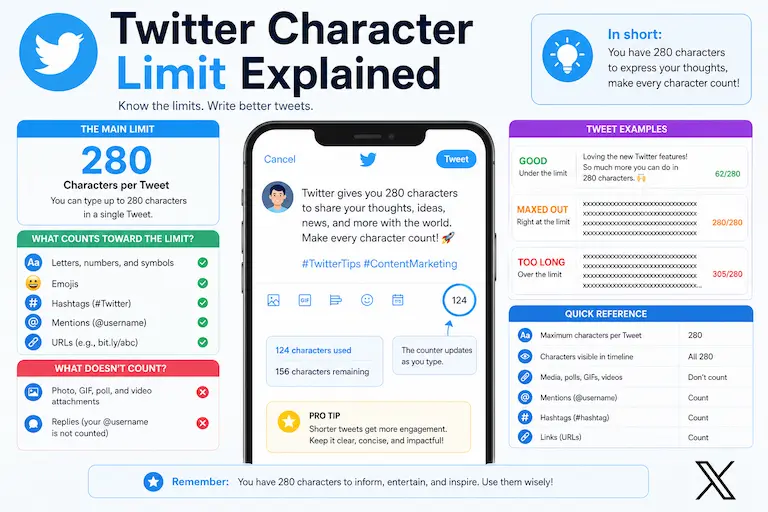
Understanding the Twitter Character Limit is important for creators, businesses, marketers, journalists, and writers who publish content on X, formerly known as Twitter. Whether you are creating posts for audiences in the USA, UK, Canada, Australia, or elsewhere, knowing the current character limits helps you plan your message accurately.
X is built around short-form communication, although the platform now also offers longer posts for Premium subscribers. For most standard posts, the familiar 280-character limit still applies.
Character limits also matter when your post contains links, hashtags, mentions, spaces, or other formatting elements. Understanding how X handles these elements can help you avoid unexpected length issues.
In this guide, you will learn the current Twitter Character Limit, how X handles links, what practical post lengths you can consider, and how to edit posts more efficiently in 2026.
Because X can change platform features and limits, use the official X Help Center to verify current posting rules when you are working with an important or time-sensitive post.
Before we look at the details, here is the most important distinction:
- Standard X posts: up to 280 characters
- X Premium longer posts: up to 25,000 characters
What Is the Twitter Character Limit?
The standard Twitter Character Limit is:
280 Characters Per Standard Post
For a standard X post, the familiar maximum is 280 characters. X’s official Help Center confirms that a regular post can contain up to 280 characters.
That limit applies when you are writing:
- short updates
- marketing messages
- questions
- professional observations
- news commentary
- educational posts
However, 280 characters is not the maximum length available to every X subscriber. X Premium provides a longer-post feature that allows eligible subscribers to publish posts of up to 25,000 characters.
So when someone asks for the Twitter Character Limit, the correct answer depends on the type of account and post being discussed.
Twitter Character Limit at a Glance
| Post Type | Current Limit |
|---|---|
| Standard X post | 280 characters |
| X Premium longer post | Up to 25,000 characters |
| URL inside a post | Counted as 23 characters after X processing |
X confirms that longer posts are a Premium feature and can contain up to 25,000 characters. X also states that URLs posted on the platform are converted through its t.co link service and are counted as 23 characters.
This distinction matters because a long URL does not consume its full visible length when X calculates the post length.
If you want to understand how character limits differ across platforms, see our guide to Why Character Limits Matter on Social Media.
Check Your Tweet Length Before Posting
If you regularly create posts for X, checking your draft before publishing can prevent unnecessary editing at the last moment.
Our Character Counter Without Spaces can help you inspect the non-space character count of your draft. Because X applies its own platform-specific counting rules, including special URL handling, use the tool as an editing aid rather than assuming its result is identical to X’s final counter.
How X Counts Characters
Character counting on X is not simply a matter of counting the visible length of every URL. Some elements receive special treatment when a post is processed.
Letters, Numbers, and Punctuation
Ordinary text such as letters, numbers, spaces, and punctuation contributes to the length of your post.
Links
X automatically processes URLs through its t.co link service. According to X, a URL of any length is counted as 23 characters when posted.
This means a very long URL does not consume its full visible length in the final post count.
Hashtags
Hashtags use part of the available post space. Adding many hashtags can make a short post harder to read, so use them selectively and only when they are relevant.
Mentions
Mentions also use space within your post. If your message contains several usernames, account for them when planning the available text.
Emojis and Special Characters
Emojis and special characters can affect character counting differently from what their visual appearance suggests. When a post is close to the limit, check the final count in X rather than relying only on a visual estimate.
Ideal Tweet Length for Better Engagement
The maximum Twitter Character Limit is not the same thing as an ideal post length. You do not need to use all 280 characters simply because they are available.
There is also no universal character count that guarantees engagement. The right length depends on your topic, audience, format, and purpose.
HubSpot’s published social media analysis lists 240–259 characters as an ideal range for X posts based on the research it cites. Treat this as a useful benchmark rather than a guaranteed result for every account or audience.
HubSpot also emphasizes that social media length guidelines are not an exact science and recommends testing different amounts of text to see what works for your own audience. You can review the research in its social media character count guide.
The better approach is to use research-based ranges as starting points and then evaluate how different post lengths perform for your own audience.
Why Short Tweets Can Work Well
Short posts can make an idea easier to understand quickly, particularly when the message has a clear purpose.
Benefits of Concise Posts
- They make the main point easier to identify.
- They leave less unnecessary wording to edit.
- They can be easier to scan on mobile screens.
- They leave more room for a link or call to action.
- They can make a focused question easier to answer.
However, shorter does not automatically mean better. A useful post should contain enough context for the reader to understand the point.
When Longer Posts Work Best
Longer posts can be useful when the subject genuinely requires more explanation.
- Storytelling
- Educational explanations
- Tutorials
- Detailed commentary
- Industry analysis
- Professional thought leadership
X Premium subscribers can currently create posts of up to 25,000 characters, so longer-form publishing is now possible directly within X. However, additional length should serve the reader rather than simply fill the available space.
For longer posts, use short paragraphs, useful spacing, clear transitions, and straightforward language.
If your draft contains repeated spaces, clean them before publishing with the Remove Extra Spaces tool. This is particularly useful when copied text contains accidental double spaces or inconsistent spacing.
Twitter Character Limit for Hashtags
Hashtags use part of your available post space, so adding more hashtags leaves less room for your main message.
Use Relevant Hashtags
Instead of filling a post with hashtags, choose only those that genuinely describe the topic or help users discover relevant conversations.
For example, a post about academic writing might use a focused hashtag such as #AcademicWriting rather than a long list of unrelated tags.
Relevant hashtags preserve readability while still providing useful context.
Why the Twitter Character Limit Matters for Search Visibility
X posts can appear outside the platform, including in search engines and other websites. Clear, relevant writing can therefore make your social content easier for people to understand when they encounter it elsewhere.
However, the Twitter Character Limit itself is not an SEO ranking factor that guarantees higher search visibility.
For better discoverability, focus on:
- clear wording
- relevant terminology
- useful information
- accurate descriptions
- natural keyword usage
8 Powerful Tips for Writing Better Tweets
1. Start With a Strong Hook
Use the opening words to communicate the main idea or create a clear reason to continue reading.
2. Remove Unnecessary Words
Replace long phrases with concise alternatives when the meaning remains clear.
3. Keep One Main Idea
A focused post is usually easier to understand than one that tries to cover several unrelated subjects at once.
4. Use Short Paragraphs
When writing a longer X post, break information into readable sections rather than creating one large block of text.
5. Use Links Carefully
Remember that X processes posted URLs through its t.co service and counts each URL as 23 characters. Leave enough room for your main message and context.
6. Limit Unnecessary Hashtags
Use hashtags that are genuinely relevant instead of filling the available space with unrelated tags.
7. Review Sentence Structure
Long sentences can make social posts harder to scan. Use the Sentence Counter to review the number and structure of sentences when editing longer posts.
8. Check the Final Character Count
Before publishing, check your final draft rather than estimating its length. The Character Counter Without Spaces can help you review the non-space character count, while X’s own composer should be used for the final platform-specific check.
Common Twitter Posting Mistakes
Writing Too Much Without a Clear Point
A longer post is not automatically more useful. Remove information that does not support the main idea.
Using a Weak Opening
Start with the most useful or interesting part of the message instead of spending the opening on unnecessary background.
Overusing Hashtags
Excessive hashtags can make a post harder to read and leave less space for the actual message.
Ignoring Spacing
Copied text can contain repeated spaces or awkward formatting. Clean unnecessary spacing before publishing.
Treating Every Character Count as Exact
Third-party counters may calculate characters differently from a platform’s own composer. When a post is close to the limit, verify the final length directly in X.
Twitter Character Limit for Businesses
Businesses use X for customer communication, marketing, product updates, industry commentary, and brand communication.
- Customer support updates
- Product announcements
- Educational content
- Industry commentary
- Promotional campaigns
For business posts, clarity matters more than trying to use every available character. A concise message can be effective when it communicates the purpose, provides enough context, and gives the reader a useful next step.
For another platform-specific example, read our guide to the LinkedIn Post Character Limit in 2026.
How to Write SEO-Friendly Tweets
Use Relevant Keywords Naturally
Use words that accurately describe your subject, but do not repeat keywords simply to manipulate visibility.
Add Useful Context
A specific statement is generally more useful than a vague post because readers can understand what the content is actually about.
Make the Opening Clear
Put the central idea early so readers do not have to search through unnecessary wording to understand the point.
Avoid Keyword Stuffing
Natural language is easier to read and gives the post a more professional tone.
Best Tools for Twitter Content Optimization
Only a few TextToolPro tools have a strong enough connection to the Twitter Character Limit to justify linking them here. These three have clear, defensible uses.
Character Counter Without Spaces
The Character Counter Without Spaces is the primary tool for reviewing the non-space character count of a tweet or longer X post.
Because X counts the final post according to its own platform rules, including special URL handling, use this tool as a supporting editing check and verify the final count in X when you are close to the limit.
Remove Extra Spaces
The Remove Extra Spaces tool is a useful secondary option when copied text contains repeated spaces. Cleaning unnecessary spaces can make a post more polished and prevent accidental spacing from using available text space.
Sentence Counter
For longer X posts, the Sentence Counter can help you review sentence structure and decide whether a dense section would be clearer when divided into shorter sentences.
Why Twitter Character Limit Still Matters in 2026
Although X Premium now supports posts of up to 25,000 characters, the standard Twitter Character Limit remains 280 characters for regular posts.
This means writers still need to understand the standard limit when preparing short-form posts for general X publishing.
The practical goal is not simply to use fewer characters. It is to use the available space efficiently.
- Keep the main idea clear.
- Remove unnecessary wording.
- Use links and hashtags selectively.
- Format longer posts for readability.
- Check the final character count before publishing.
Check Your Tweet Length Instantly
If you regularly create content for X, review your draft before publishing.
Use the Character Counter Without Spaces to inspect the non-space character count, clean repeated spaces with the Remove Extra Spaces tool, and review sentence structure with the Sentence Counter.
For a post close to the limit, always verify the final count directly in X because platform-specific counting rules can differ from a basic character counter.
FAQs About the Twitter Character Limit
What Is the Twitter Character Limit?
The standard Twitter Character Limit is 280 characters per post. X Premium subscribers can create longer posts of up to 25,000 characters.
Do Hashtags Count in the Twitter Character Limit?
Yes. Hashtags use part of the available text space in your post.
Do Links Count in the Twitter Character Limit?
Yes. X processes posted URLs through its t.co link service, and its official documentation states that a URL is counted as 23 characters when posted.
Can You Post More Than 280 Characters on X?
Yes. X Premium subscribers can create longer posts of up to 25,000 characters. Standard posts remain limited to 280 characters.
What Is the Best Tweet Length for Engagement?
There is no universal ideal length that guarantees engagement. HubSpot’s published analysis identifies 240–259 characters as an ideal range for X posts based on the research it cites, but the best length can vary by audience, topic, and account. HubSpot also recommends testing different amounts of text rather than treating one range as a universal rule.
What Is the Best Tool for Checking the Twitter Character Limit?
The Character Counter Without Spaces is useful for reviewing the non-space character count of a draft. For an exact final check near the platform limit, verify the count directly in X.
Why Does the Twitter Character Limit Matter?
The Twitter Character Limit determines how much text can be included in a standard post. Understanding it helps writers plan concise messages and avoid exceeding the platform’s publishing limit.
Final Thoughts
Understanding the Twitter Character Limit is important for anyone creating content on X.
For standard posts, the limit remains 280 characters. X Premium also provides longer posts of up to 25,000 characters, so the available limit now depends on the type of account and post.
The best approach is to write for clarity first, remove unnecessary wording, use links and hashtags carefully, and check the final post length before publishing.
Whether you are creating professional content for readers in the USA, UK, Canada, Australia, or another market, the same principle applies: use the available character space to communicate something useful rather than simply trying to reach the maximum.
You can also compare X with another major platform using our guide to the LinkedIn Post Character Limit in 2026.