
LinkedIn Post Character Limit 2026
LinkedIn Post Character Limit 2026: Ultimate Guide to the Best Post Length for Maximum Reach
If you’re creating content for LinkedIn in 2026, understanding the LinkedIn Post Character Limit 2026 can help you plan posts that fit the platform’s publishing limit while keeping your message clear and readable.
Whether you’re a marketer in the United States, recruiter in the United Kingdom, consultant in Canada, or entrepreneur in Australia, understanding LinkedIn’s current character limits can help you prepare content for the platform more effectively.
In this comprehensive guide, you’ll learn:
- The current LinkedIn post character limit in 2026
- How the character limit differs from recommended post length
- Important limits for comments, headlines, profiles, and messages
- How to structure posts for readability
- How text tools can help you review LinkedIn content
Because LinkedIn can change platform limits and features, it is sensible to check the official LinkedIn Help Center when you need to verify a current platform rule.
What Is the LinkedIn Post Character Limit 2026?
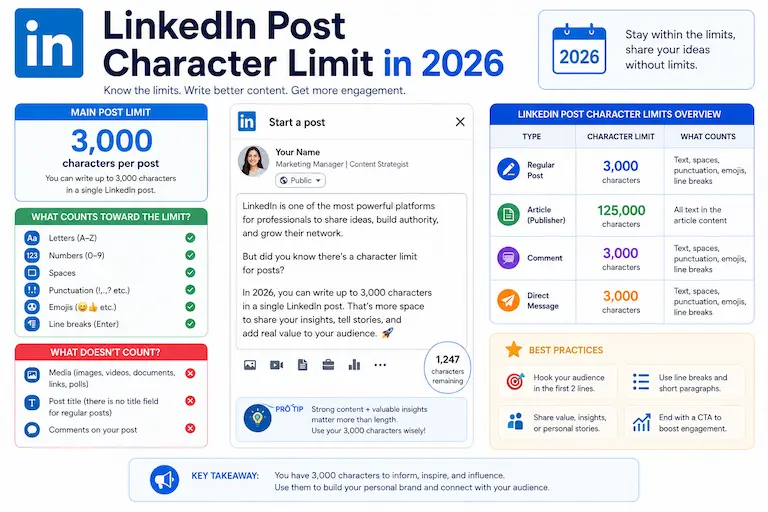
The LinkedIn Post Character Limit 2026 for a standard LinkedIn post is:
3,000 characters
LinkedIn’s official Help Center confirms that a standard post can contain up to 3,000 characters. If a post exceeds that limit, LinkedIn directs users to its publishing platform for longer-form content.
When planning a post, remember that the character count includes the text you enter, so spaces, punctuation, emojis, hashtags, and URLs all use part of the available space.
The 3,000-character limit is a maximum, not a recommended target. A shorter post can be appropriate when the idea can be communicated clearly without using the full limit.
The maximum LinkedIn post length is different from the length that may be practical for your audience. HubSpot’s social-media research also distinguishes platform limits from recommended character counts, reinforcing the importance of testing different lengths rather than assuming that using the maximum will produce better results.
HubSpot: How Long Should Your Social Media Posts Be?
Need to review the amount of text in your draft before publishing?
LinkedIn Character Limits in 2026 (Quick Reference)
LinkedIn uses different limits for different areas of the platform. The figures below distinguish the standard post limit from other commonly used fields and features.
| Content Type | Character Limit |
|---|---|
| LinkedIn Post | 3,000 characters |
| LinkedIn Article | 125,000 characters |
| Profile Headline | 220 characters |
| About Section | 2,600 characters |
| Comment | 1,250 characters |
| Connection Request Note | 200 characters for Basic accounts; up to 300 for Premium |
| InMail Subject | 200 characters |
| InMail Body | 1,900 characters |
LinkedIn’s official documentation confirms the 3,000-character post limit and the 125,000-character article limit. LinkedIn also documents different personalized-invitation limits depending on account type, so connection-request notes should not be presented as one universal number.
Why the LinkedIn Post Character Limit 2026 Matters
Understanding the LinkedIn Post Character Limit 2026 helps you:
- Avoid exceeding the platform’s post limit
- Plan the amount of information you want to include
- Write more concise opening lines
- Keep long posts easier to scan
- Leave room for useful context, links, or calls to action
The character limit tells you how much text you can publish; it does not guarantee a particular level of reach or engagement. Post performance depends on factors such as topic, audience, content quality, timing, and how people respond to the post.
Best LinkedIn Post Length for Engagement in 2026
The 3,000-character limit should not be confused with an ideal length. There is no single character count that guarantees better engagement for every LinkedIn post.
Short Posts
150–400 characters
Short posts can work well when the purpose is to share:
- A quick insight
- A concise observation
- A personal update
- A focused question
Medium Posts
500–1,200 characters
This range can provide enough room for:
- Short storytelling
- Educational explanations
- Practical advice
- Thoughtful commentary
Long Posts
1,500–3,000 characters
A longer post can be useful for:
- Case studies
- Detailed tutorials
- Step-by-step explanations
- In-depth professional analysis
Choose the length that allows you to communicate the idea clearly rather than adding text simply to approach the 3,000-character maximum.
If you want to explore how character limits affect content across different platforms, read Why Character Limits Matter on Social Media.
How to Count LinkedIn Characters Accurately
Before publishing, review your draft against the LinkedIn post character limit. Because LinkedIn’s 3,000-character limit includes spaces and other characters in your post, a counter that excludes spaces should not be treated as an exact LinkedIn-limit checker.
Our Character Counter Without Spaces can still be useful when you want to see how much of your text consists of non-space characters. For an exact LinkedIn limit check, make sure your final count includes spaces as well.
Clean Unnecessary Spaces Before Counting
Repeated or accidental spaces can make a LinkedIn post look untidy and consume characters unnecessarily. The Remove Extra Spaces tool can clean repeated spaces before you perform your final character-count check.
This tool does not calculate the LinkedIn limit itself. Its role is to clean the draft so unnecessary spacing does not use characters that could be used for meaningful content.
Review Sentence Structure
For longer LinkedIn posts, the Sentence Counter can help you review sentence structure and identify sections that may benefit from shorter, clearer sentences.
These tools support editing, but the final LinkedIn character count should include spaces and should be verified with an appropriate full-character counter or LinkedIn’s own publishing interface.
How to Write a High-Performing LinkedIn Post
Start With a Strong Hook
Your opening lines should communicate the main idea quickly and give readers a clear reason to continue. Do not assume that a particular character count guarantees more engagement.
Examples:
- “I tested this LinkedIn strategy for 30 days…”
- “Most professionals overlook this posting mistake.”
- “Here is what I learned from changing my LinkedIn content.”
Keep Paragraphs Short
Short paragraphs make longer posts easier to scan, especially on smaller screens.
Use White Space Strategically
Line breaks can separate ideas and make a long post easier to follow. Remember that line breaks still use space within the overall content you publish.
Include a Clear Call to Action
Examples include:
- “What do you think?”
- “Have you tried this?”
- “What has worked for you?”
LinkedIn Formatting Tips for 2026
To work effectively within the LinkedIn Post Character Limit 2026, focus on clarity rather than trying to use every available character.
Use Emojis Selectively
Emojis can help separate ideas or add emphasis, but they also contribute to the content you publish and should be used only when they fit the tone of the post.
Use Relevant Hashtags
Use hashtags only when they are relevant to the subject of your post. Avoid adding hashtags simply to fill space.
Avoid Keyword Stuffing
Write naturally and use relevant terminology where it genuinely helps readers understand the topic.
Use Lists When They Improve Scannability
Bullets and numbered points can make several related ideas easier to read and remember.
LinkedIn Character Limits Beyond Posts
LinkedIn Comment Character Limit
Commonly reported LinkedIn comment limits are around 1,250 characters. Because LinkedIn can change limits and not every field is documented in the same way as the standard post limit, check the current interface when working close to a limit.
LinkedIn Headline Character Limit
The LinkedIn profile headline limit is commonly listed as 220 characters.
LinkedIn About Section Character Limit
The LinkedIn About section is commonly listed as 2,600 characters.
LinkedIn Connection Request Limit
LinkedIn currently documents personalized connection-request messages at 200 characters for Basic accounts. Premium members can send personalized invitations with a limit of 300 characters per note. LinkedIn also applies different limits to how many personalized invitations can be sent, depending on the account. :contentReference[oaicite:1]{index=1}
Common Mistakes to Avoid
Writing Weak Opening Lines
If the opening does not clearly communicate the purpose of the post, readers may have less reason to continue.
Ignoring Character Counts
Always check the length of a post before publishing when you are working close to the 3,000-character limit.
Leaving Unnecessary Spaces
Extra spaces can make a post less polished and use characters unnecessarily. Remove them when they do not contribute to the formatting of your content.
Using Overly Long Sentences
Long or complicated sentences can make professional posts harder to scan. Break them up when doing so improves clarity.
LinkedIn Post Template for 2026
Hook
Most professionals underestimate how much planning matters when writing within the LinkedIn Post Character Limit 2026.
Problem
They may either provide too little context or add unnecessary words that make the post harder to read.
Solution
Choose a length that fits the idea, use concise paragraphs, and finish with a useful call to action.
CTA
What post length works best for your audience?
LinkedIn SEO Tips for Better Visibility
LinkedIn search visibility depends on useful, relevant content and clear language. Include important terms naturally when they help describe your topic.
Relevant terms may include:
- LinkedIn post length
- LinkedIn character counter
- Best LinkedIn post length
- LinkedIn caption limit
- LinkedIn engagement tips
- Social media character limits
- Professional networking content
- Thought leadership posts
- LinkedIn algorithm 2026
- Optimize LinkedIn posts
Use these terms naturally rather than repeating them simply for search-engine optimization.
Who Should Care About the LinkedIn Post Character Limit 2026?
This guide can be useful for:
- Digital marketers
- Recruiters
- Job seekers
- B2B founders
- Sales professionals
- Coaches
- Consultants
- Content creators
Anyone using LinkedIn to communicate with a professional audience can benefit from understanding the platform’s publishing limits.
Final Thoughts
The LinkedIn Post Character Limit 2026 for a standard LinkedIn post is 3,000 characters. That is the maximum, not a requirement to make every post as long as possible.
Choose a length that suits your subject, keep the opening clear, use readable formatting, and review the final character count before publishing.
Whether you’re targeting professionals in the USA, UK, Canada, Australia, or another market, the same basic principle applies: write for your audience first and use the available character space only when the additional information adds value.
Each platform has different character limits. See our guide to the Instagram Caption Character Limit.
You can also compare the limits of another major social platform in our guide to the Twitter Character Limit.
Optimize Your LinkedIn Posts Instantly
Before publishing your next update, use the Character Counter Without Spaces to review the non-space character count of your draft.
If your draft contains repeated spaces, clean them with the Remove Extra Spaces tool before checking the final character count.
You can also use the Sentence Counter to review sentence structure when editing a longer post.
Remember that LinkedIn’s 3,000-character post limit includes spaces, so these tools should support your editing process rather than replace a full character count.
FAQs About LinkedIn Post Character Limit 2026
What is the LinkedIn Post Character Limit 2026?
The standard LinkedIn post character limit in 2026 is 3,000 characters. LinkedIn’s official Help Center confirms this limit. :contentReference[oaicite:2]{index=2}
What is the best LinkedIn post length for engagement?
There is no universal character count that guarantees engagement. The most appropriate length depends on the topic, audience, format, and amount of information needed to communicate the idea clearly.
Do spaces count in the LinkedIn Post Character Limit 2026?
Yes. When working within LinkedIn’s character limit, spaces and other characters in your post use part of the available space. The standard post limit is 3,000 characters. :contentReference[oaicite:3]{index=3}
How many characters are visible before “See more”?
The visible portion before the “See more” prompt can vary by device, layout, and formatting. Treat commonly reported character counts as approximate presentation points rather than fixed LinkedIn character limits.
What tool should I use to check the LinkedIn Post Character Limit 2026?
The Character Counter Without Spaces can help you inspect the non-space character count of a draft. The Remove Extra Spaces tool can clean repeated spaces, while the Sentence Counter can help review sentence structure. Because LinkedIn’s limit includes spaces, use a full character counter or LinkedIn’s own interface for the final limit check.
Has the LinkedIn Post Character Limit 2026 changed?
As of 2026, LinkedIn’s standard post limit is 3,000 characters. Because platform rules can change, check LinkedIn Help when you need to verify a limit for time-sensitive publishing work. :contentReference[oaicite:4]{index=4}