
Instagram Caption Character Limit: 9 Secret Tips to Avoid Costly Mistakes
Understanding the Instagram Caption Character Limit is important for creators, influencers, businesses, marketers, and social media managers who publish content on Instagram. Whether you create content for audiences in the USA, UK, Canada, Australia, or elsewhere, knowing the current limit helps you plan captions without sacrificing clarity or useful context.
Many users write captions without checking character length, spacing, readability, or keyword placement. A caption can fit within the limit and still be difficult to scan if the wording is repetitive or poorly structured.
In this complete guide, you will learn the current Instagram caption character limit, practical caption-length considerations, hashtag rules, formatting techniques, Instagram SEO basics, and ways to check your draft before publishing in 2026.
What Is the Instagram Caption Character Limit?
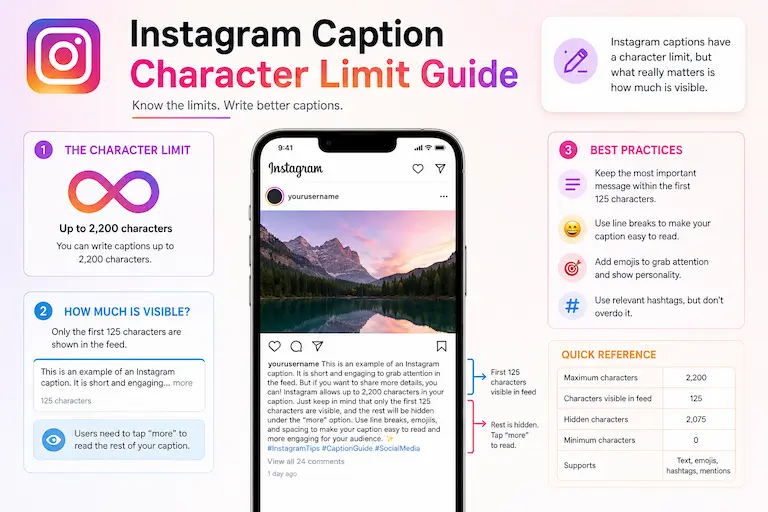
The current Instagram Caption Character Limit is 2,200 characters per caption.
2,200 Characters Per Caption
Your caption can contain different types of text and formatting, including:
- Letters
- Numbers
- Spaces
- Emojis
- Symbols
- Hashtags
- Line breaks
However, reaching the 2,200-character maximum is not necessary for every post. A short caption may be appropriate for a simple visual, while a longer caption may be useful for storytelling, education, instructions, or detailed context.
Hootsuite’s current Instagram guidance also lists the caption limit as 2,200 characters and shows an approximate 125-character feed preview before the reader expands the caption. Treat the preview length as approximate because display behavior can vary with platform updates and devices. Hootsuite’s social media caption preview guide provides the current platform comparison.
That makes the opening portion of your caption important: put the main idea, useful context, or strongest reason to continue reading near the beginning.
You can check the non-space character count of your draft with our free tool before performing the final platform-specific check in Instagram.
The Character Counter Without Spaces is useful for reviewing draft length while editing your caption.
Why the Instagram Caption Character Limit Matters
The Instagram Caption Character Limit determines how much text you can use to explain, support, or add context to your visual content.
Caption length can affect how much information you can include, but length alone does not guarantee engagement, reach, or visibility. The appropriate length depends on the purpose of the post, the audience, and how much explanation the content requires.
A well-structured caption can help readers find:
- The main point
- Important context
- Instructions or explanations
- A relevant call to action
- Useful keywords
This is useful whether you create content for audiences in the USA, UK, Canada, or another market because the basic goal remains the same: make the caption clear, relevant, and useful.
If you want to learn more about counting characters without spaces, read our practical guide:
How to Count Characters Without Spaces Correctly
Ideal Instagram Caption Length for Better Engagement
Instagram allows up to 2,200 characters, but you do not need to use the full limit for every caption.
Recommended Caption Lengths
| Content Type | Practical Starting Point |
|---|---|
| Quick engagement post | Short and focused |
| Educational caption | Long enough to explain the idea clearly |
| Storytelling caption | As long as needed to tell the story |
| SEO-focused caption | Use relevant information without unnecessary length |
Hootsuite’s current 2026 guidance lists approximately 138–150 characters as a benchmark for organic Instagram captions. It also distinguishes this practical benchmark from Instagram’s 2,200-character maximum. Treat the range as a starting point rather than a universal rule for every account or topic. Hootsuite’s current social media post-length guide explains the benchmark and its limitations.
The right approach is to test different caption lengths and evaluate how your own audience responds rather than assuming one character count will work for every post.
For another platform-specific example, read our guide to the Twitter Character Limit Explained.
Instagram Caption Character Limit for Hashtags
Instagram’s hashtag rules have changed, so older articles that mention 30 hashtags per post are now outdated.
Up to 5 Hashtags Per Post
As of December 18, 2025, Instagram limits posts and Reels to five hashtags. Later’s current Help Center documentation confirms the five-hashtag limit for Instagram posts and Reels. Later’s current Instagram publishing guidance documents the change.
Hashtags Also Use Caption Space
Hashtags are part of the caption text, so they also use part of the available 2,200-character space.
For example, if your caption and hashtags use 500 characters in total, approximately 1,700 characters remain available within the 2,200-character limit.
The practical goal is not to maximize the number of hashtags. Use a small number of relevant tags that accurately describe the content.
Why Short Instagram Captions Often Perform Better
Short captions can work well when the image or video already communicates most of the message.
Benefits of Short Captions
- Faster scanning
- Clearer messaging
- Easier mobile reading
- Less unnecessary wording
- More room for the visual content to carry the message
However, short does not automatically mean better. A caption should be long enough to provide whatever context the reader needs.
For longer captions, the Sentence Counter can help you review sentence density and identify sections that may be easier to read after restructuring.
When Long Instagram Captions Work Best
Long captions can be appropriate when the content genuinely requires additional explanation.
Best Uses for Long Captions
- Storytelling
- Tutorials
- Educational content
- Personal branding
- Case studies
- Product education
A longer caption gives you room to explain an idea, provide context, answer a question, or guide the reader through several points.
It can be especially useful for:
- Coaches
- Educators
- Consultants
- Influencers
- Business brands
The important distinction is that additional length should add value rather than simply fill the available character space.
How Instagram SEO Uses Captions
Captions can provide useful context about what a post is about. Relevant wording can therefore support how people discover and understand content on Instagram.
For Instagram SEO, focus on:
- Relevant words in captions
- Natural keyword usage
- Accurate content descriptions
- Relevant hashtags
- Clear account information
Do not treat caption length itself as a guaranteed ranking factor. Instead, use captions to communicate the subject clearly and naturally.
Important Instagram SEO Tips
Use Relevant Keywords
Add natural keywords that accurately describe your post and match the language your audience may use when searching.
Avoid Keyword Stuffing
Repeating keywords unnaturally can make a caption difficult to read. Use keywords where they genuinely fit the subject.
Write Human-Friendly Captions
Clear, natural language makes it easier for readers to understand the purpose of your content.
Add Clear CTAs
When appropriate, tell readers what to do next, such as comment, save, share, visit your profile, or learn more.
Best Practices for Instagram Captions
Start With a Strong Hook
The opening portion of your caption is important because Instagram shows only a short preview before readers expand the text. Hootsuite’s current preview tool uses approximately 125 characters as the Instagram feed cut-off and notes that the exact display can vary. Hootsuite’s caption preview guide explains the current behavior.
Weak Hook
“Today I want to talk about marketing.”
Better Hook
“Your Instagram captions may be harder to read than they need to be.”
Use Line Breaks
Breaking a long caption into short sections can make it easier to scan, especially on a mobile screen.
Good spacing can improve:
- Readability
- Scanning
- Visual organization
- Mobile presentation
If copied text contains repeated spaces, clean them before publishing with the Remove Extra Spaces tool.
Use Short Sentences
Shorter sentences can make captions easier to scan. For a longer educational caption, review sentence structure and break up dense passages where necessary.
Add a Call to Action
Depending on the purpose of the post, encourage readers to:
- Comment
- Share
- Save
- Send a message
- Visit your profile
Avoid Too Many Emojis
Emojis can add personality and visual breaks, but using too many can make a professional or educational caption harder to read.
Common Instagram Caption Mistakes
Writing Generic Captions
A generic caption may provide little context about the actual post. Make the wording specific to the image, video, topic, or audience.
Ignoring Character Limits
Writing without checking the length can make the editing process more difficult, particularly when your caption is close to the 2,200-character limit.
Using Too Many Hashtags
Instagram’s current limit is five hashtags per post or Reel, so focus on a small number of specific and relevant tags rather than relying on the older 30-hashtag rule. Later’s current documentation confirms the five-hashtag limit. See Later’s current Instagram publishing guidance.
Forgetting Mobile Optimization
Captions are commonly read in a mobile-first environment, so short paragraphs, clear spacing, and an informative opening can make the text easier to scan.
Weak First Sentence
A weak opening can hide the main value of the post below the visible caption preview. Put useful information or a clear hook near the beginning.
Instagram Caption Character Limit for Businesses
Businesses use captions for:
- Branding
- Storytelling
- Product launches
- Promotions
- Customer education
A business caption should provide enough information for its intended purpose without adding unnecessary wording. The right length depends on whether the post announces a product, explains a feature, answers a question, or supports a visual campaign.
Rather than assuming that major brands always use a particular caption length, focus on the underlying principle: concise writing can be useful when the visual carries the main message, while longer captions can be appropriate when additional context provides value.
For another platform-specific comparison, read our guide to the LinkedIn Post Character Limit in 2026.
How to Write SEO-Friendly Instagram Captions
Use Primary Keywords Naturally
Include relevant search terms where they naturally describe the subject of the post.
Add Contextual Keywords
Related terms can provide additional context, but they should fit naturally into the caption instead of being inserted solely for search purposes.
Keep Important Information Early
Because only part of a caption is visible before the reader expands it, place important context or the primary message near the beginning. Hootsuite’s current Instagram preview guidance uses approximately 125 characters as the typical feed cut-off. View the current caption preview guidance.
Optimize for Humans First
Readable captions are easier for people to understand. Do not sacrifice clarity simply to insert additional keywords.
Best Tools for Instagram Caption Optimization
Three TextToolPro tools have a clear, defensible connection to Instagram caption editing: one primary tool for character length and two secondary tools for readability and formatting.
Character Counter Without Spaces
The primary tool for this topic is the Character Counter Without Spaces. It helps you inspect the non-space character count of a caption while editing.
Use it as a drafting and editing aid, then perform the final platform-specific check inside Instagram, especially when your caption is close to the limit.
Sentence Counter
The Sentence Counter is a moderate secondary tool for longer educational, storytelling, or business captions. It helps you review sentence density and identify sections that may be easier to read after restructuring.
Remove Extra Spaces
The Remove Extra Spaces tool is another useful secondary option when text copied from another document contains repeated spaces or inconsistent spacing. Cleaning the draft before publishing can make the caption more polished.
Why Instagram Caption Optimization Matters in 2026
Instagram continues to evolve, including its caption and hashtag rules. That makes it useful to review current platform limits rather than relying on older social-media guides.
Modern creators should pay attention to:
- Readability
- Relevant keywords
- Accurate context
- Formatting
- Audience intent
- Appropriate calls to action
Captions can provide context for visual content, communicate a message, support discoverability, and guide readers toward a useful next step.
Optimize Your Instagram Captions Instantly
If you regularly create Instagram posts, check the draft before publishing so you can identify unnecessary wording and review its character count.
Use the Character Counter Without Spaces for the primary character-count check, then use the Sentence Counter and Remove Extra Spaces tools when your draft needs readability or formatting cleanup.
For a caption close to the limit, verify the final result directly in Instagram because a third-party counter may not reproduce every platform-specific behavior.
FAQs
What Is the Instagram Caption Character Limit?
The current Instagram Caption Character Limit is 2,200 characters per caption.
Do Hashtags Count in the Instagram Caption Character Limit?
Yes. Hashtags are part of the caption text and use part of the available character space.
How Many Hashtags Can You Use on Instagram?
Instagram currently allows up to five hashtags per post or Reel. Later’s current documentation confirms the five-hashtag limit introduced in December 2025.
What Is the Best Instagram Caption Length?
There is no universal ideal length for every account. Hootsuite currently lists approximately 138–150 characters as a benchmark for organic Instagram captions, but the appropriate length depends on the content, audience, and purpose of the post.
Can Long Instagram Captions Improve Engagement?
Long captions can be useful for storytelling, education, instructions, and detailed context. However, caption length alone does not guarantee better engagement, so write as much as the subject requires.
What Is the Best Tool for Checking Instagram Caption Character Limit?
The Character Counter Without Spaces is the most directly relevant TextToolPro tool for reviewing a caption’s non-space character count. For the final platform-specific result, verify the draft directly in Instagram.
Does Instagram SEO Use Captions?
Captions can provide useful text and context about a post. Use relevant keywords naturally, but do not treat keyword repetition or caption length as a guaranteed ranking formula.
Final Thoughts
Understanding the Instagram Caption Character Limit is useful for creators, influencers, businesses, marketers, and social media managers who publish on Instagram.
Instagram captions can contain up to 2,200 characters, but using the maximum is not necessary for every post. Short captions can work well when the visual carries the message, while longer captions can be appropriate for storytelling, education, and detailed explanations.
The most practical approach is to:
- Check the caption length.
- Put important information near the beginning.
- Use relevant keywords naturally.
- Use no more than five hashtags per post or Reel.
- Keep paragraphs and sentences readable.
- Review the final caption directly in Instagram before publishing.
Whether you create content for audiences in the USA, UK, Canada, Australia, or another market, these principles help you adapt the caption to the topic and audience rather than relying on an arbitrary character target.
If you want to compare character limits across social platforms, read our complete guide: